


Hostinger is the hosting company everyone recommends and nobody explains properly.
You see “₹139/month” on a banner ad, sign up, and four years later your renewal invoice is more than three times what you expected.
This review covers what you actually get, what it actually costs across four years, and the things that would make me tell you to buy something else.
I’ve been a Hostinger customer for three years, and I run this site on their Premium plan — so every screenshot below is from my real account rather than a marketing page.
This article contains affiliate links. If you buy through one, this site earns a commission at no extra cost to you — and you get the discount that’s already applied at checkout. It doesn’t change what’s written below, including the renewal-pricing and speed-test sections.
What Is Hostinger?
Hostinger is a budget web hosting provider that runs shared, cloud, and VPS hosting on LiteSpeed servers, managed through its own control panel instead of cPanel.
It’s been around since 2004, serves over 4 million customers across 150+ countries, and is one of the hosts officially recommended by WordPress.org.
What separates it from other cheap hosts is that the cheapness isn’t the whole story.
Most budget hosting is slow. Hostinger runs LiteSpeed web servers, NVMe storage on its higher plans, and a built-in CDN — the kind of stack you’d normally pay considerably more for.
Here’s what you get on every plan:
- hPanel: a custom control panel built to be simpler than cPanel
- Free SSL: auto-renewed, on every site
- 24/7 live chat: plus Kodee, an AI assistant that handles routine tasks
- 30-day money-back guarantee: a real exit, not a store credit
Take Rohit, a freelancer launching his first affiliate blog. He needs a domain, hosting, WordPress, and an SSL certificate — and he’d rather not learn server administration to get them.
That’s the exact person Hostinger is built for.
Here’s what the dashboard looks like:
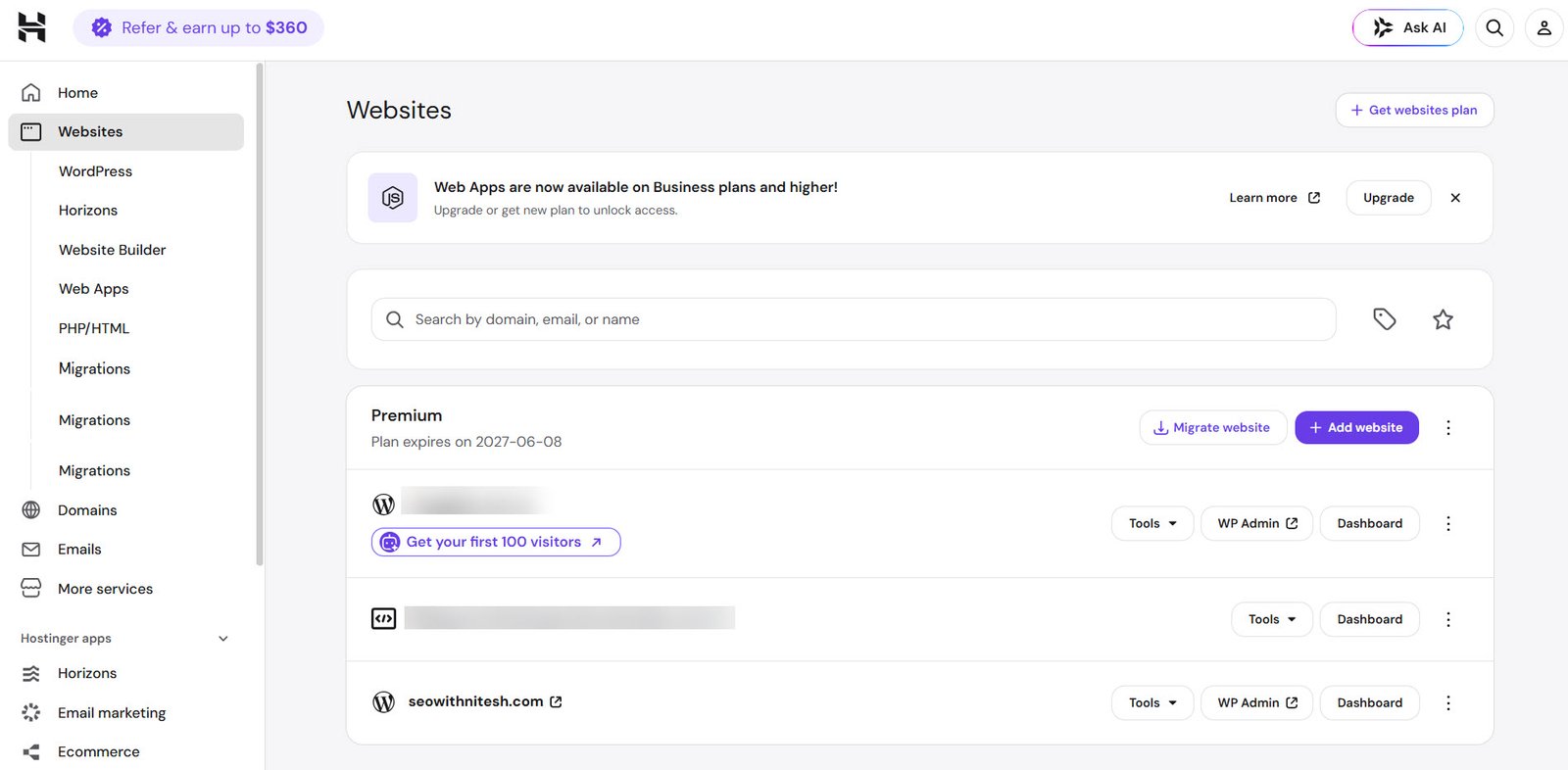
Notice there’s no cPanel-style grid of 80 icons. That’s the main design decision Hostinger made, and it’s the right one for most people.
Hostinger Pricing in India: The Honest Version
Start here, because this is where most reviews mislead you.
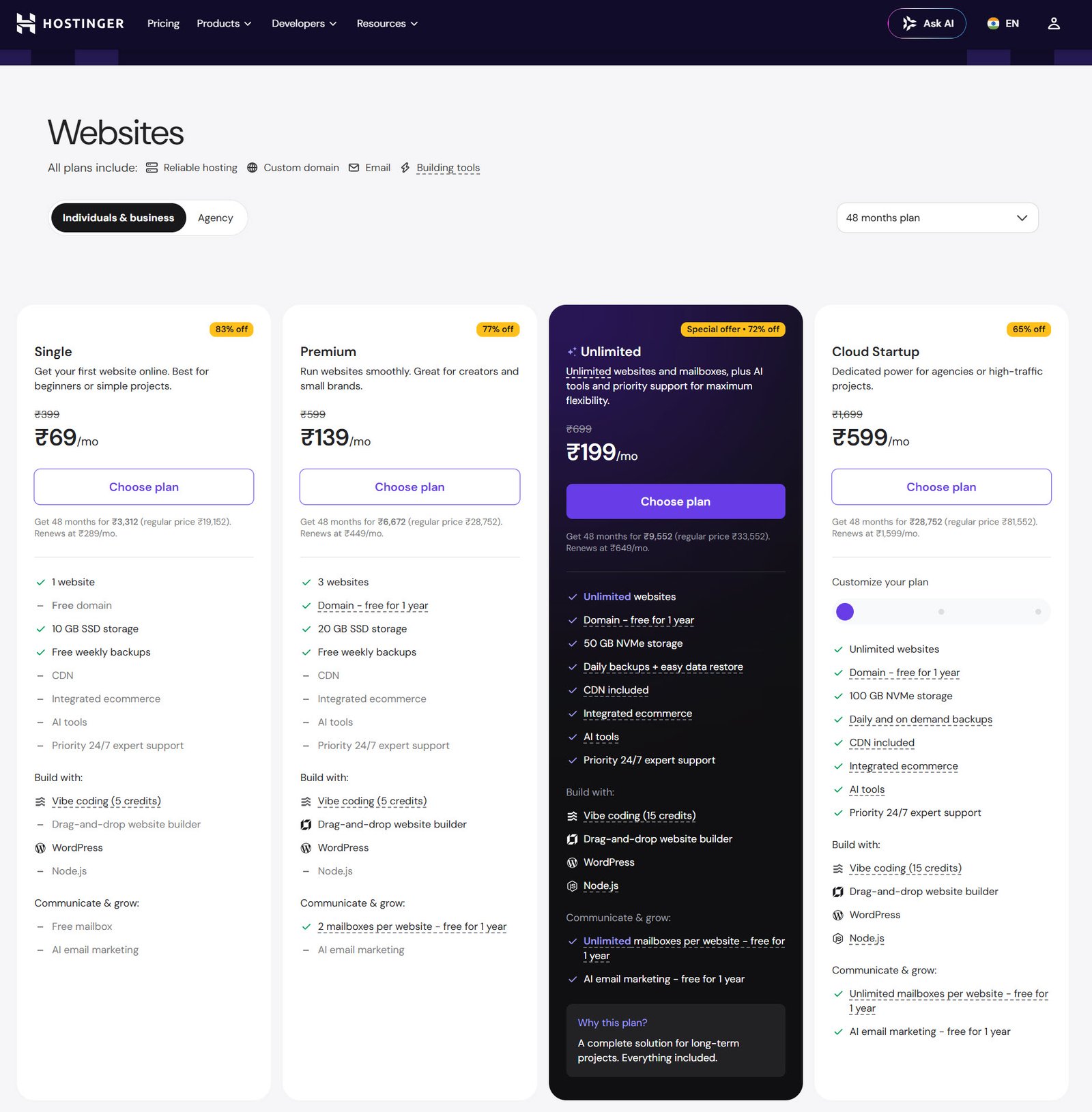
Hostinger’s India lineup runs four plans: Single at ₹69/month, Premium at ₹139, Unlimited at ₹199, and Cloud Startup at ₹599.
Those prices are real — but every one of them requires a 48-month commitment paid upfront, and none of them applies when you renew.
Here’s what the renewal actually looks like:
- Single: ₹69/mo → renews at ₹289/mo
- Premium: ₹139/mo → renews at ₹449/mo
- Unlimited: ₹199/mo → renews at ₹649/mo
- Cloud Startup: ₹599/mo → renews at ₹1,599/mo
That’s a 3.2x jump on Premium, not the “roughly double” most reviews describe.
So what does that mean in practice?
Rohit paying ₹139/month on a 48-month Premium term pays ₹6,672 upfront for four years. That’s genuinely cheap — about ₹1,668 a year. But in year five his cost becomes ₹5,388, and he needs to plan for that rather than be surprised by it.
Here’s the pricing page:
What Each Plan Actually Includes
The specs matter more than the price gaps, because two of them decide which plan you need.
- Single (₹69): 1 website, 10 GB SSD, weekly backups, no free domain, no CDN
- Premium (₹139): 3 websites, 20 GB SSD, weekly backups, free domain for year one, 2 mailboxes per site
- Unlimited (₹199): unlimited websites, 50 GB NVMe, daily backups, CDN, AI tools, priority support
- Cloud Startup (₹599): unlimited websites, 100 GB NVMe, daily and on-demand backups, dedicated resources
Note the website limit on Premium. It’s three, not the unlimited figure many older reviews still quote.
And note where daily backups start: Unlimited, not Premium.
Note
Hostinger rotates promotions constantly, so the discount percentages shift month to month. The renewal column is the number that doesn’t move much — check it at checkout before you commit.
You can verify the renewal price inside your own account too:
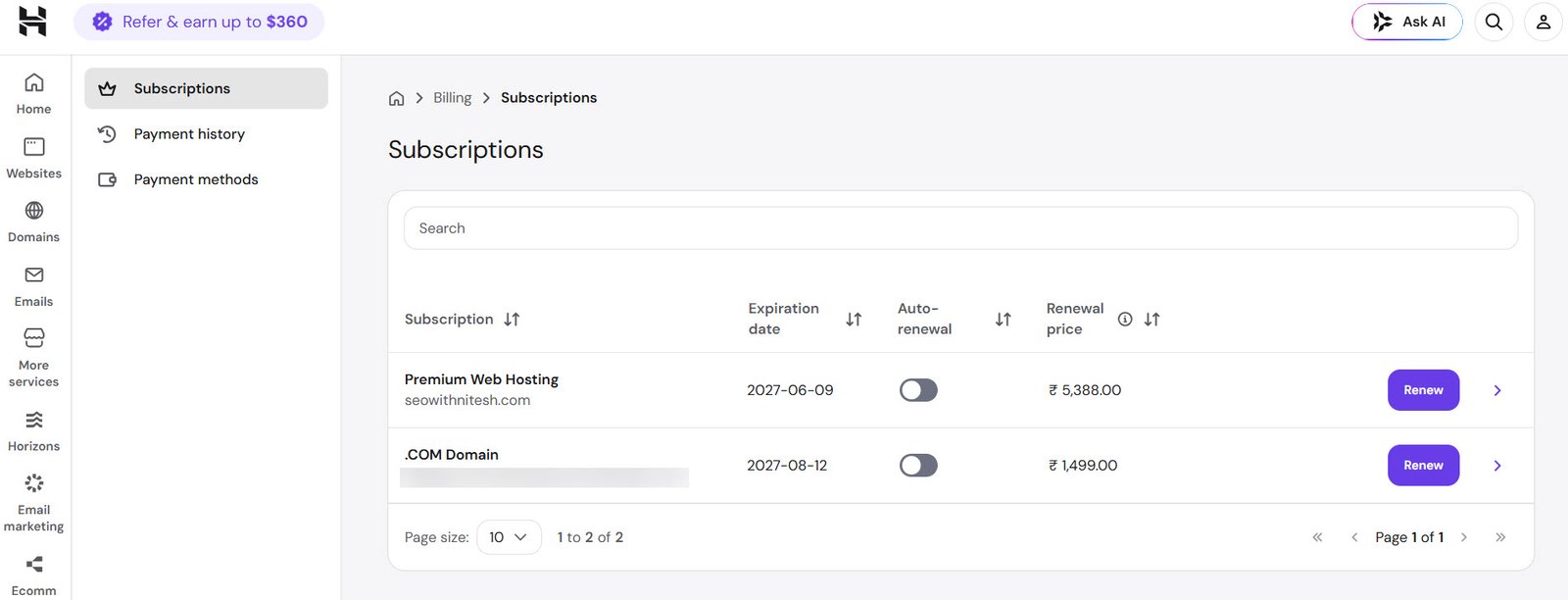
Almost no Hostinger review shows this screen. ₹5,388 a year works out to ₹449/month — exactly what the pricing page promises, which is at least honest of them.
What Indian Buyers Get Specifically
Hostinger’s India setup is genuinely localized, not just a currency conversion.
You get checkout in INR with UPI, net banking, and card options, GST invoices generated automatically, and the option of a Mumbai data centre.
That last one is worth checking rather than assuming.
Here’s mine:
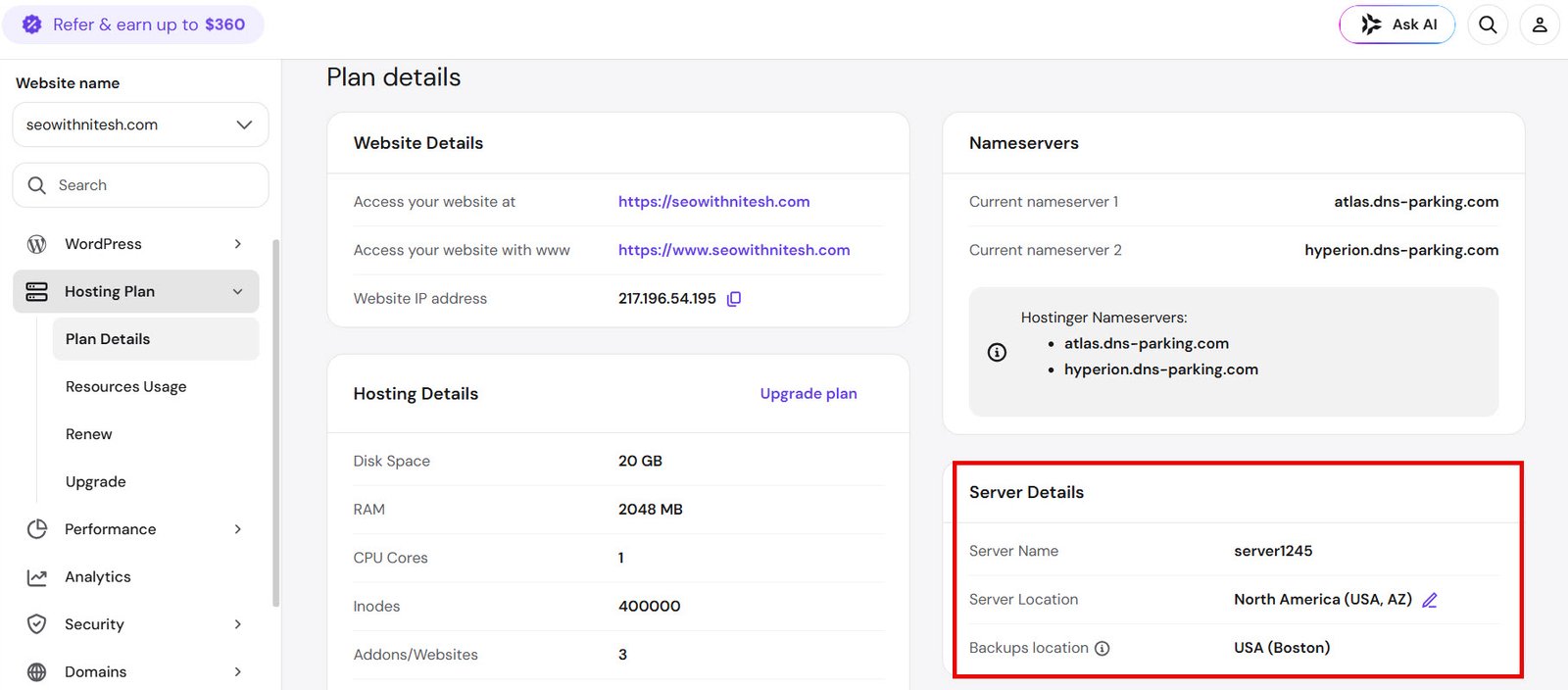
Mine still sits on a North American server, which is a fair illustration of the problem: the default isn’t always the one you want, and nothing prompts you to change it. If your audience is Indian, switch it to Mumbai from this screen — Hostinger migrates data centres at no cost.
Keep that detail in mind, because it shows up clearly in the speed test below.
The same panel confirms the plan limits: 20 GB disk, 2048 MB RAM, 1 CPU core, 3 websites.
Why Does Hosting Choice Matter?
Because it’s the one decision that touches everything else you do.
Slow hosting caps your Core Web Vitals no matter how much you optimize page speed on the front end. Downtime costs you rankings and sales at the same time. And migrating later is a weekend you won’t get back.
Three things actually matter:
- Server response time: TTFB is the floor your whole site sits on
- Uptime: a 99.9% guarantee still allows about 43 minutes of downtime a month
- Support quality: the thing you don’t value until 2am on a launch night
Everything else — storage caps, email accounts, control panel design — is negotiable.
Performance and Speed
This is where Hostinger outperforms its price bracket — with one caveat that most reviews skip.
The stack is LiteSpeed Web Server with LiteSpeed Cache, NVMe storage on Unlimited and above, an in-house CDN, and Object Cache on WordPress plans.
LiteSpeed matters more than most spec sheets suggest. It handles cached WordPress requests dramatically faster than standard Apache, and reviewers testing both consistently report 2–3x better TTFB on comparable plans.
Uptime in independent testing holds at or above the advertised 99.9%.
But don’t take a review’s word for it. Here’s this site, on the ₹139 Premium plan.
Desktop first:
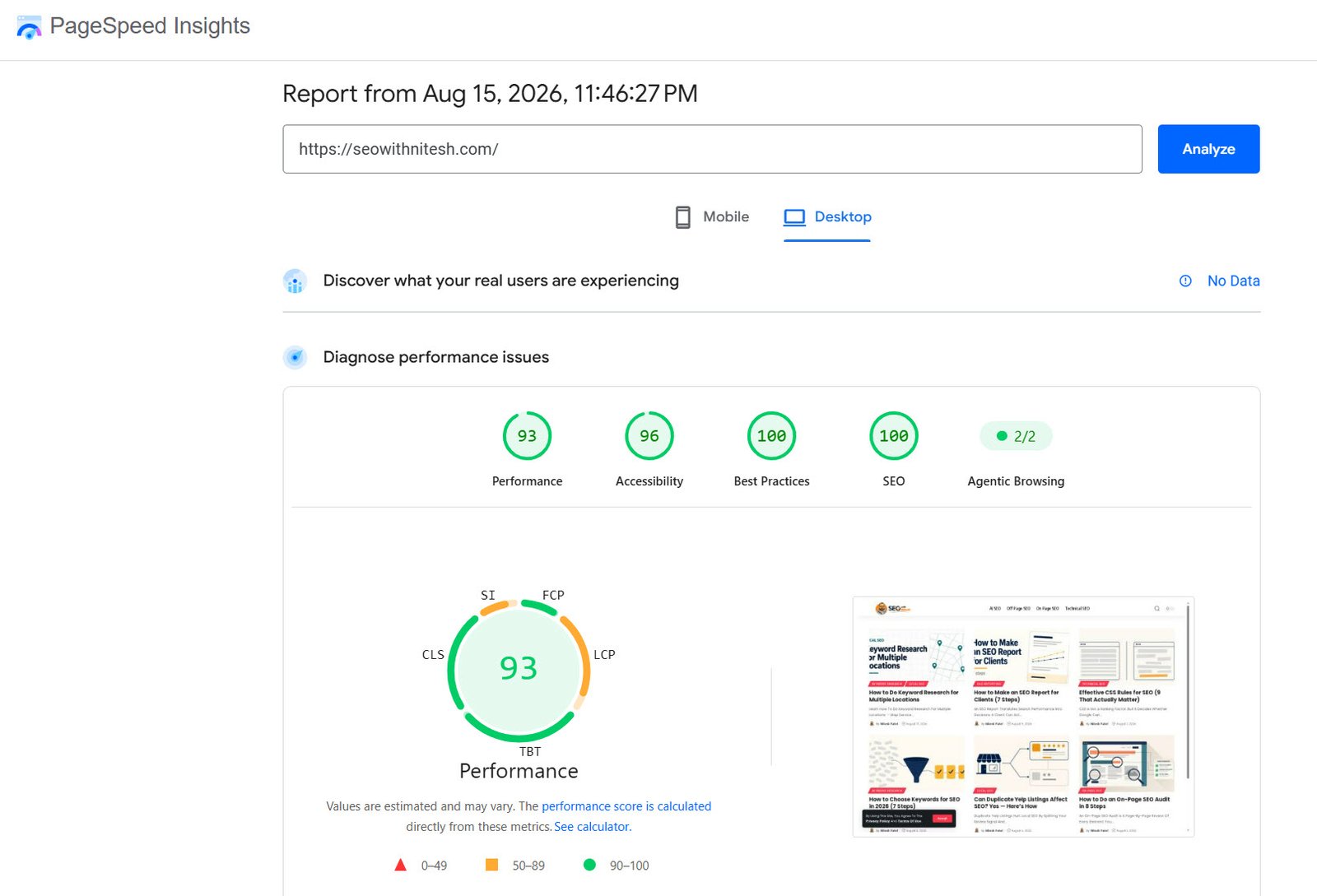
93 on desktop. That’s a good score for shared hosting at this price.
Now the number most reviews don’t publish:
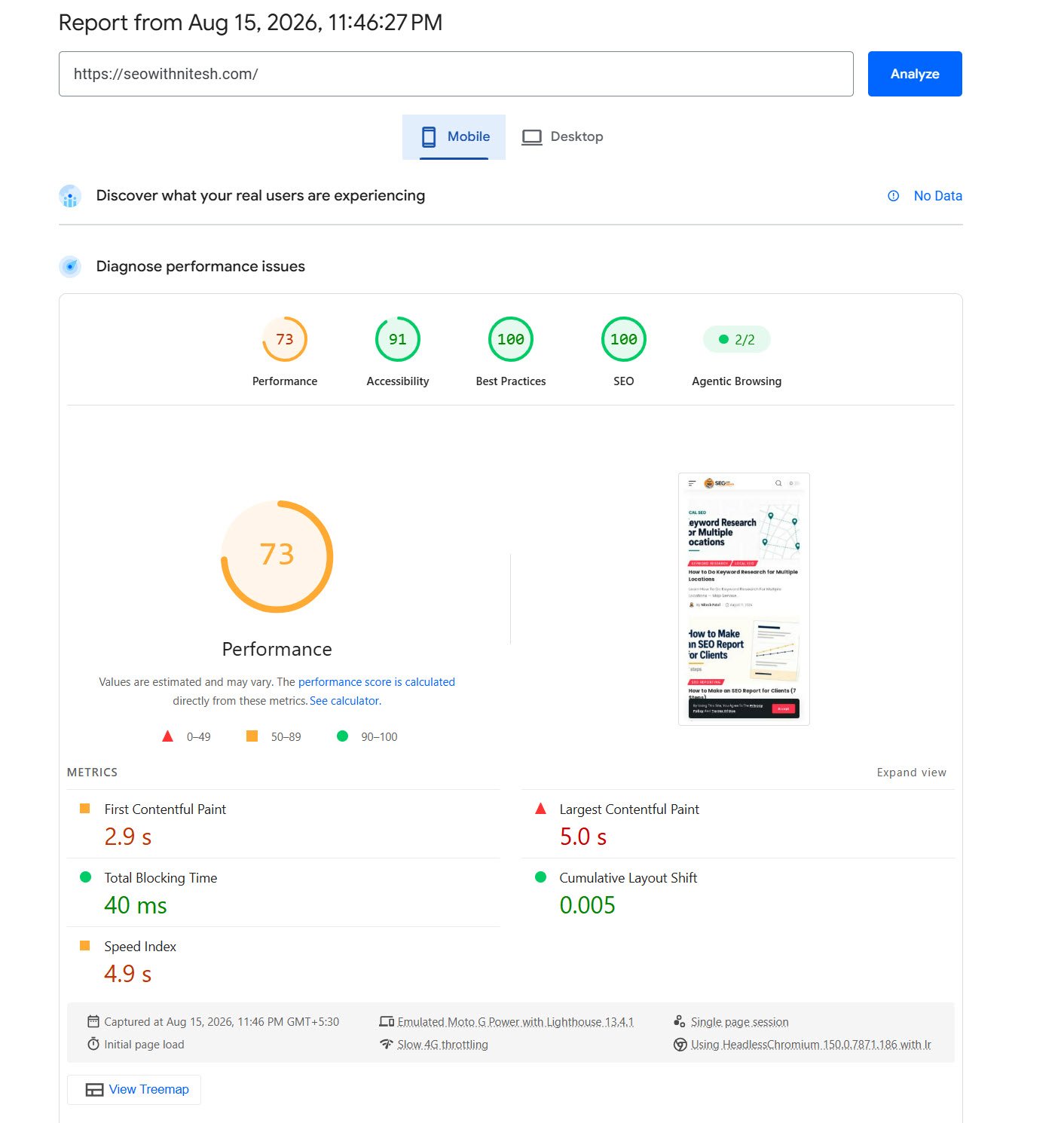
73 on mobile, with Largest Contentful Paint at 5.0 seconds. That fails Google’s Core Web Vitals threshold, which wants LCP under 2.5 seconds.
So what’s actually going on there?
Look at which metrics pass and which fail. Total Blocking Time is 40ms and Cumulative Layout Shift is 0.005 — both excellent, and both largely determined by the theme and scripts rather than the host. The failing metrics are the loading ones: LCP at 5.0s, Speed Index at 4.9s, First Contentful Paint at 2.9s.
That pattern points at server distance, not at the site build. This test runs on simulated Slow 4G, and the request has to travel to a North American server and back.
Which brings the Mumbai point back around. The single highest-impact change available on this account isn’t a caching plugin or an image format — it’s moving the site to a data centre near its readers.
Tip
Run PageSpeed Insights on both tabs before and after a data centre migration. LCP and Speed Index are the two numbers that should move; TBT and CLS shouldn’t change much, because those are yours, not your host’s.
One more caveat on both reports: they show no real-user field data, so these are lab measurements under simulated conditions, not what your visitors actually experience.
Here’s the caching setup behind those numbers:
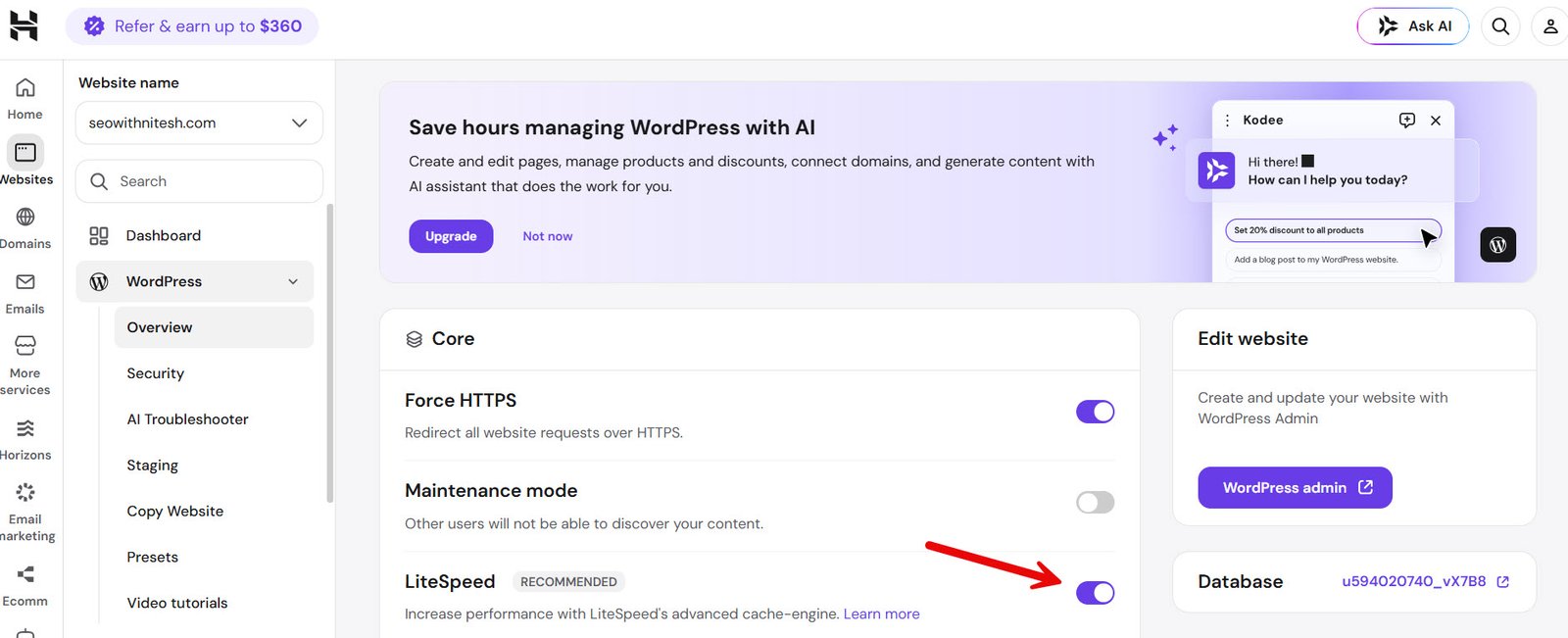
LiteSpeed is a single toggle here. That’s the whole configuration — no plugin hunting, no cache-plugin conflicts to debug.
hPanel and Ease of Use
Hostinger doesn’t use cPanel. It built hPanel instead.
For beginners, that’s a clear win — cleaner navigation, plain-language labels, contextual tutorials, and one-click WordPress installation.
For experienced developers who’ve used cPanel for a decade, it’s a mild annoyance. Things are where Hostinger decided they should be, not where you expect them.
Which group are you in?
If you’ve never touched a control panel, hPanel is the easiest one you’ll find at this price. If you manage 30 client sites and know cPanel blindfolded, budget a week of mild friction.
Installing WordPress looks like this:
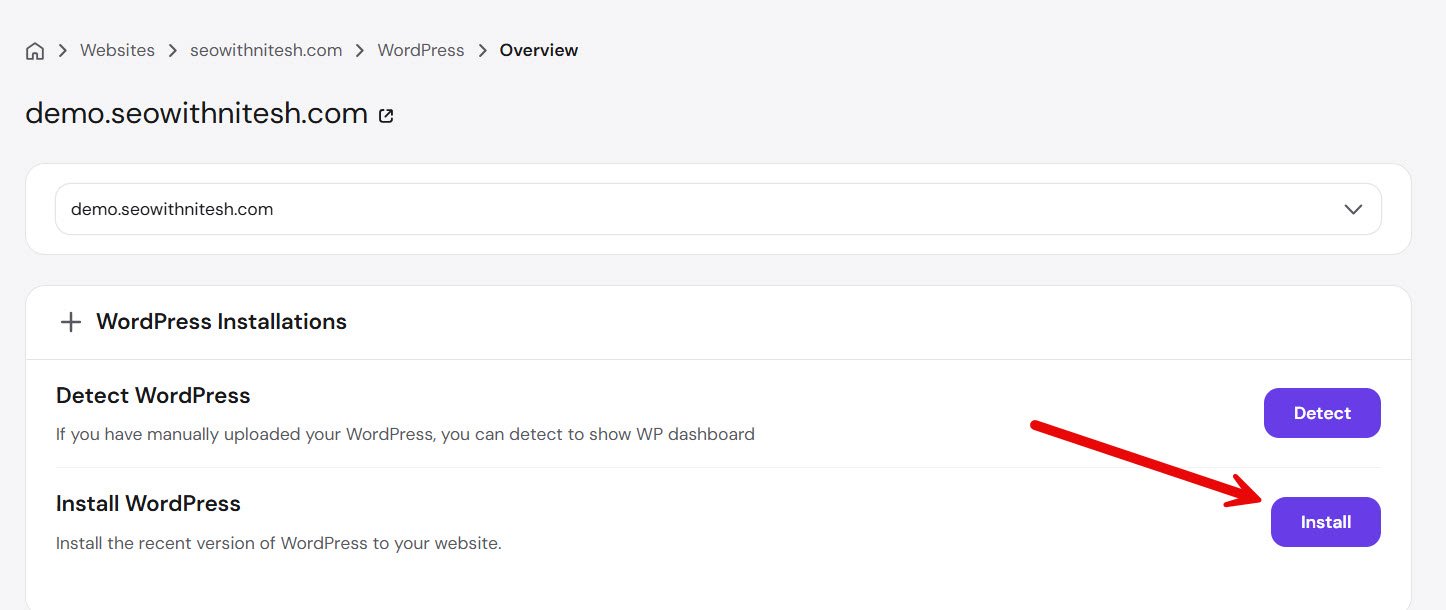
One button. Note the Detect option beside it — useful if you’ve migrated a site in manually and want it to appear in hPanel’s managed tools.
Kodee and the AI Tools
Hostinger has pushed hard on AI, and some of it is more than marketing.
Kodee is an AI assistant inside hPanel and the WordPress dashboard. It handles real tasks — toggling maintenance mode, forcing HTTPS, adjusting LiteSpeed Cache settings, flushing caches, and troubleshooting errors — through plain chat instructions.
Here’s it clearing this site’s cache:
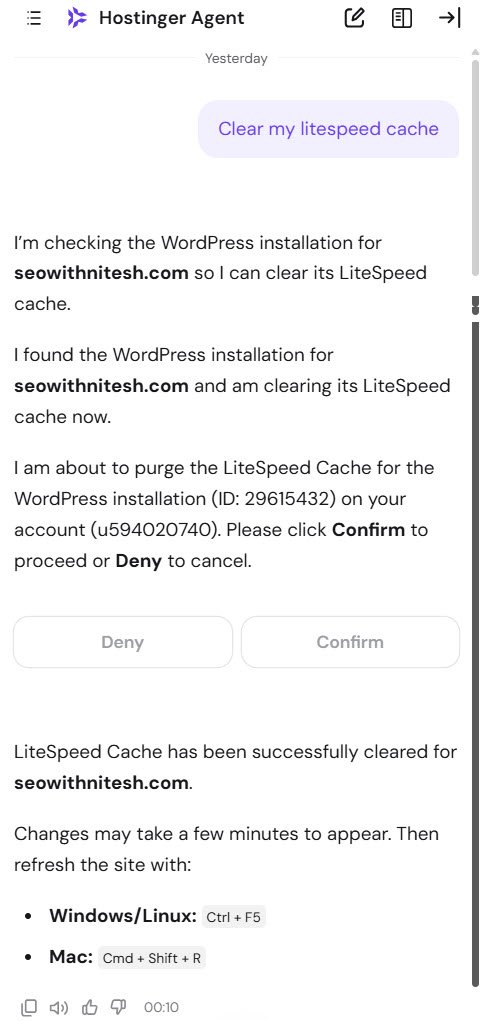
Note the Confirm and Deny buttons. Kodee stops and asks before it acts on your site rather than executing straight away — the right design for an agent with write access to your installation.
Alongside it sit an AI Website Builder, an AI Troubleshooter, and Hostinger Horizons, a prompt-based builder that generates a full site from a description.
Note
AI tools are listed as a paid-tier feature from Unlimited upward. Kodee’s basic assistance works on lower plans, but the fuller AI toolkit sits behind the ₹199 plan.
Security and Backups
The security stack is more complete than the price suggests.
You get free SSL with auto-renewal, two-factor authentication, Cloudflare-protected nameservers, a web application firewall, malware scanning, and plugin vulnerability detection.
Backups are where the plans genuinely differ, and this is the one spec worth paying up for.
Single and Premium get weekly backups. Unlimited and Cloud Startup get daily.
Is ₹60/month worth the upgrade?
If your site changes weekly — a blog, a portfolio — weekly is survivable. If you take orders or publish daily, a week-old restore point is a week of lost work, and Unlimited pays for itself the first time you need it.
Here’s the restore panel:
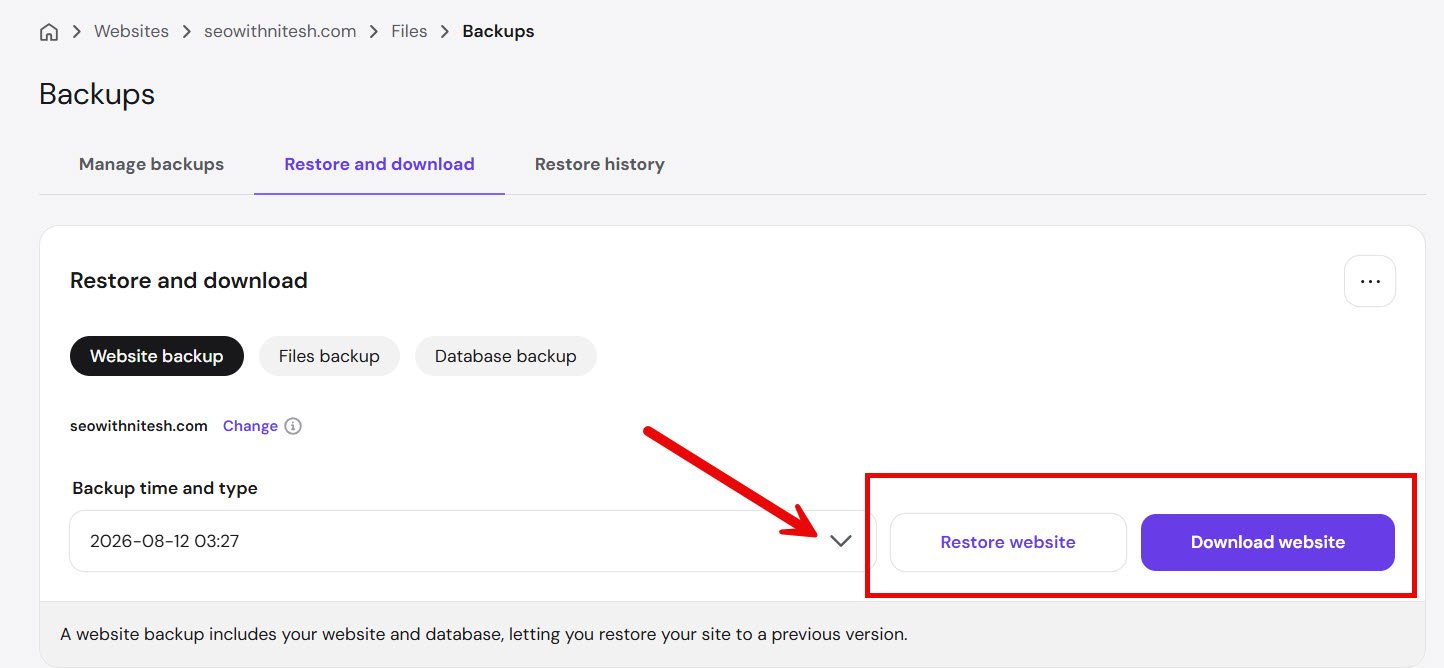
Note the Download option next to Restore. That’s the one to use before any major update — keep your own copy rather than relying only on Hostinger’s.
Support
Support is 24/7 live chat and email. There is no phone line.
Reviewers consistently report first-reply times in the two-to-four-minute range, which is fast for this price tier.
Kodee handles the first layer now, and it’s genuinely capable on technical questions — but you can escalate to a human agent, and you should for anything account-related.
Priority support is a paid-tier feature, listed from Unlimited upward.
The honest limitation: for a mission-critical production site, chat-only support is a real constraint. If you need someone on a phone at 3am, this isn’t your host.
What’s Actually Wrong With Hostinger
Three years in, these are the things I’d want someone to tell me before I signed up.
The renewal gap is steep. Premium triples at renewal, from ₹139 to ₹449. Price increases at renewal are standard across hosting, but 3.2x is at the sharper end, and the low intro price is what makes it feel that way.
The long commitment is the catch. Those prices need 48 months paid upfront. The 30-day money-back guarantee softens it, but you’re committing four years to get the headline rate.
Premium caps at three websites. Many reviews still quote much higher limits. Three is the real number, and 20 GB of storage goes with it.
Weekly backups on Premium. Daily backups, CDN, and the AI toolkit all start at Unlimited. If any of those matter, your real entry price is ₹199, not ₹139.
Mobile performance needs work on a distant server. A 73 mobile score with a 5-second LCP isn’t a good Core Web Vitals result. It’s fixable by moving data centres, but it’s a real cost of the default setup.
The default server may not be near your audience. Mine defaulted to North America. Fixable in two clicks, but nothing prompts you to check.
Shared hosting is shared. On busy servers you’re subject to neighbours. For genuinely high-traffic production workloads, you want Cloud or VPS.
hPanel is a learning curve for cPanel veterans. Not a flaw, but a real switching cost if you manage client sites.
Who Should Buy Hostinger?
Buy it if you’re launching a blog, portfolio, small business site, or affiliate project and want hosting, domain, SSL, and email in one place without learning server administration.
Buy it if your audience is in India and you want a Mumbai data centre with INR billing and GST invoices.
Don’t buy it if you need phone support, predictable year-five pricing, or guaranteed dedicated resources at the entry tier.
For Rohit and his first affiliate blog, this is an easy yes. For a funded startup running production infrastructure, it isn’t the right conversation.
Common Questions
Is Hostinger good for WordPress?
Yes. It’s officially recommended by WordPress.org, installs WordPress in one click, and includes LiteSpeed Cache plus Object Cache on WordPress plans.
The Kodee AI agent also works inside the WordPress admin, which is unusual at this price.
How many websites can I host on Premium?
Three. If you need more, Unlimited at ₹199/month removes the cap entirely.
Is Hostinger fast enough for Core Web Vitals?
On desktop, comfortably. On mobile it depends heavily on where your server sits relative to your readers.
This site scores 93 desktop and 73 mobile from a North American server. Moving to the Mumbai data centre is the first fix to try if your traffic is Indian.
Does Hostinger have an India data centre?
Yes, in Mumbai. You can select it at signup or migrate to it later from Plan Details at no cost — and you should check, because it isn’t always the default.
Why is the renewal price so much higher?
Because the advertised rate is a promotional first-term price tied to a 48-month commitment.
The practical answer: budget ₹449/month for Premium from year five, and treat the first four years as the discount they are.
Can I get a refund?
Yes, within 30 days on hosting plans. Domain registrations are generally excluded, since they’re bought from a registrar the moment you order.
Which plan should I actually buy?
Premium at ₹139 if you have three sites or fewer and weekly backups are enough.
Unlimited at ₹199 if you want daily backups, CDN, AI tools, or more than three sites. For ₹60 more a month, it’s the better value for most people.
Skip Single unless you’re certain you’ll only ever run one small site.
Where to Start
There’s a lot here — four tiers, term lengths, renewal math, backup schedules.
Reduce it to two decisions: Premium if three sites and weekly backups cover you, Unlimited if they don’t. Then pick the longest term you’re confident you’ll still want the site at the end of.
And use the 30 days properly. Install WordPress, switch your server to Mumbai, run PageSpeed Insights on both mobile and desktop, and ask Kodee something real.
If any of that disappoints you, you get your money back — which is the whole reason to start here rather than somewhere without that guarantee.
Get Hostinger at the discounted rate
Premium from ₹139/month with a free domain, free SSL, and a Mumbai data centre — backed by a 30-day money-back guarantee, so you can test everything above before you’re committed.

