


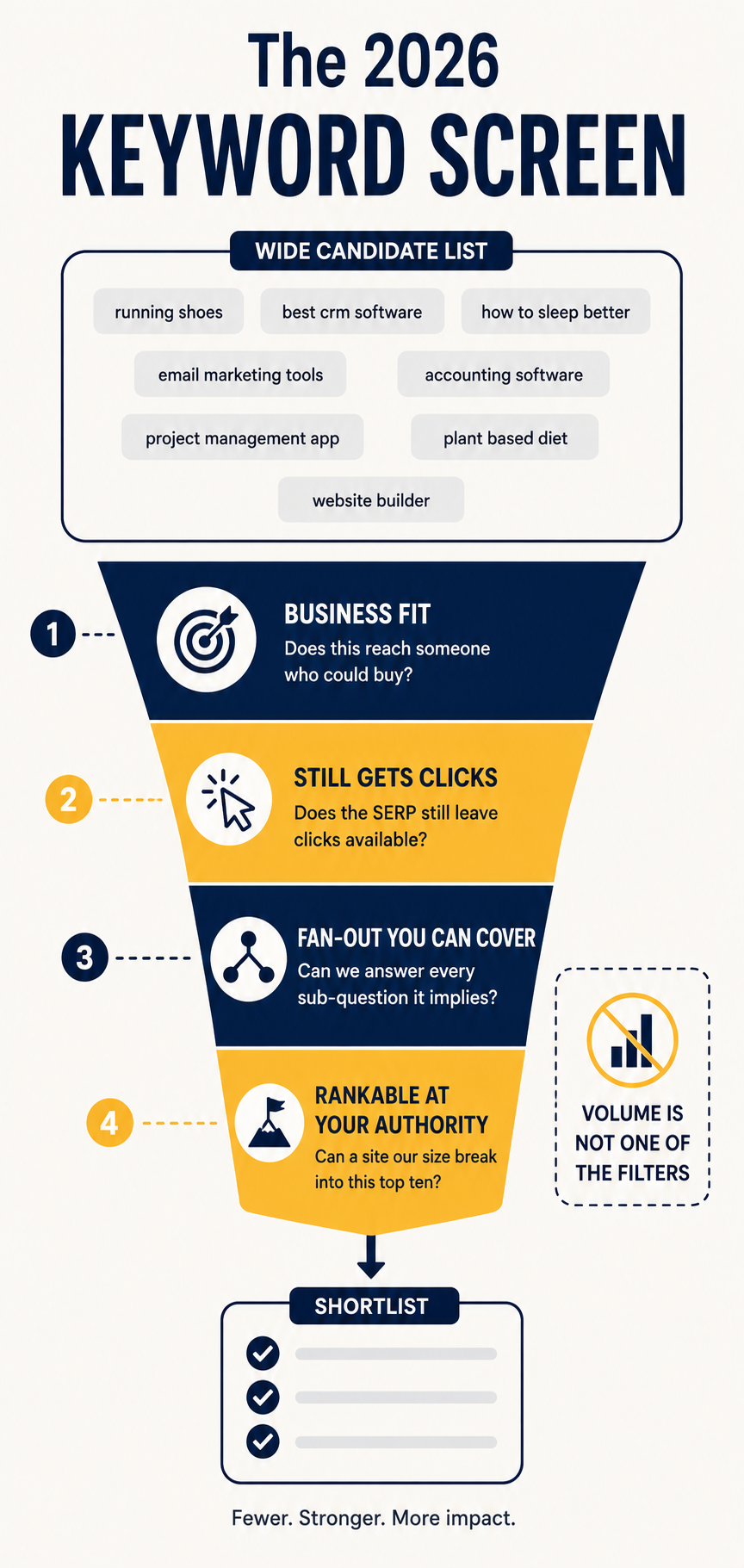
Choosing keywords for SEO in 2026 means screening candidates on four things: whether the query still produces clicks, whether you can realistically rank, whether the searcher is close to buying, and whether you can cover the sub-questions an AI system will fan the query into.
Search volume is no longer one of the four.
That’s the change, and most guides on this topic haven’t caught up. They still tell you to find high volume and low difficulty, which was correct advice in 2019 and is now a reliable way to publish content nobody reads.
Here’s why. Ahrefs reported in late 2025 that essentially all informational keywords now trigger an AI Overview. Pew Research found that when an AI Overview appears, users click a traditional result about 8% of the time, versus roughly 15% when it doesn’t.
So a keyword with 12,000 monthly searches can send you almost nothing, while one with 90 can build a business.
Volume tells you how many people ask. It no longer tells you how many arrive.
This guide covers:
- The screen: four filters that replace volume-and-difficulty
- Clickability: how to check whether a query still produces traffic
- Fan-out: why the unit of targeting is now a cluster, not a phrase
- Portfolio: balancing keywords that earn clicks against keywords that earn citations
Our running example is Kestrel Tools, a small company selling time-tracking software to construction contractors. Domain Rating 24, about 40 published pages, one content writer.
They have a keyword list with 300 terms on it. Roughly 20 are worth pursuing.
Here’s the screen that gets you from one to the other:
Let’s find them.
1. Start With the Business Outcome, Not the Search Bar
Open a document before you open a keyword tool.
Write down what a successful outcome looks like: who the customer is, what they pay for, and what problem sends them searching in the first place.
Kestrel’s answer: a contractor with 5 to 40 employees who is currently tracking hours on paper timesheets, loses money to buddy-punching and payroll errors, and switches software after a specific painful event — a botched payroll run or a labour audit.
That paragraph does more filtering work than any tool.
It immediately disqualifies “time tracking app,” a term with enormous volume that returns consumer productivity tools for freelancers. Kestrel could theoretically rank for it. Nobody who searches it would ever buy.
Write your version before continuing. Every step below is a filter, and filters need something to filter against.
Note
If you can’t name the triggering event that makes someone search, you don’t yet know your keywords. Talk to five customers first. That conversation is worth more than a month of tool exports.
2. Build the Candidate List From Four Sources
Cast wide here. Narrowing happens in Step 3.
Four sources, in order of usefulness:
- Your own Search Console data: queries you already get impressions for, especially in positions 8 to 30, where small gains produce real movement
- Competitor keyword exports: run two or three direct competitors through Ahrefs, Semrush, or a free alternative, and pull what they rank for that you don’t
- Google’s own surfaces: autocomplete, People Also Ask, related searches, and Search Console’s query report — all first-party signals of real phrasing
- Customer language: support tickets, sales call notes, review sites, and subreddit threads where your buyers complain
That fourth source is the one most people skip, and it’s where the best keywords live. Customers don’t describe their problems the way marketers do.
Kestrel’s sales calls kept surfacing one phrase: “job costing.” Nobody on the marketing team had used it. It became their highest-converting cluster.
Dump everything into a spreadsheet. Don’t judge yet. A 300-row list is fine at this stage.
3. Screen Every Keyword Against the Live SERP
This is the step that changed, and it’s non-negotiable now.
For every keyword you’re seriously considering, open an incognito window and search it. Look at what occupies the screen before the first organic result.
You’re checking three things:
- Is there an AI Overview? If yes, expect a large share of the clicks to disappear
- What else sits above organic? Ads, shopping, video carousels, local packs, People Also Ask
- Who ranks, and can you plausibly join them? Ten enterprise sites with DR 80+ is an answer
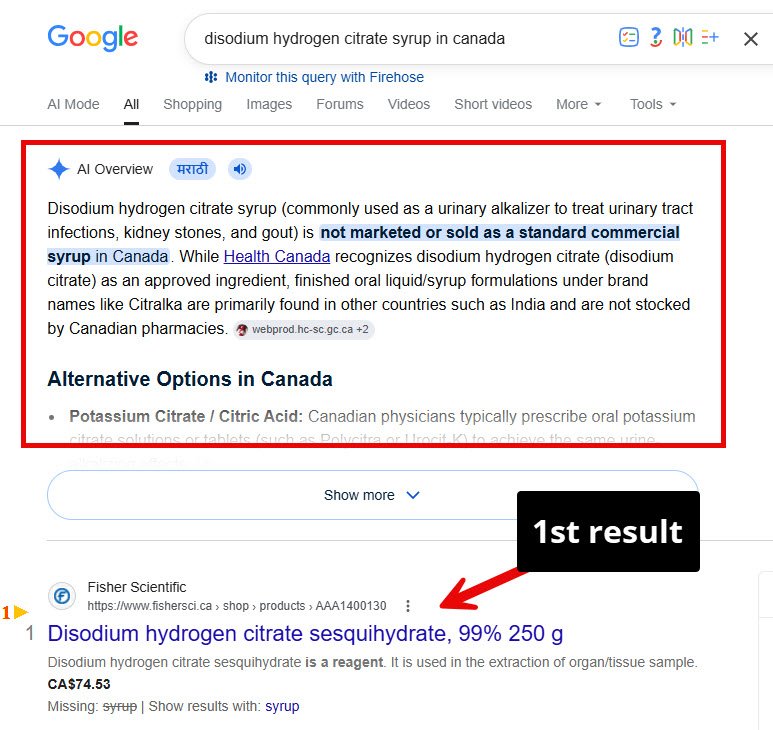
That’s the actual competition for attention. Not position one — position one after everything above it.
Do this manually for your top 30 candidates. It takes an hour and it will delete about half your list.
Why the SERP Beats the Tool
Keyword tools report volume and a difficulty score. Neither can see the layout.
Two keywords with identical volume and identical difficulty can have completely different value depending on whether an AI Overview answers the question outright. The tool shows you two identical rows. The SERP shows you one opportunity and one dead end.
Ahrefs’ December 2025 analysis of 300,000 keywords found position-one CTR dropping by roughly 58% when an AI Overview is present. That’s not a rounding error. That’s most of your traffic.
Tip
Record what you find in a column called “SERP notes.” When traffic underperforms six months later, that column tells you whether you misjudged the keyword or the content.
4. Score for Clickability, Not Volume
Replace your volume column with a clickability judgement.
The question isn’t “how many people search this.” It’s “how many people search this and still need to visit a website afterwards.”
Some queries resolve completely in an AI answer. Others cannot.
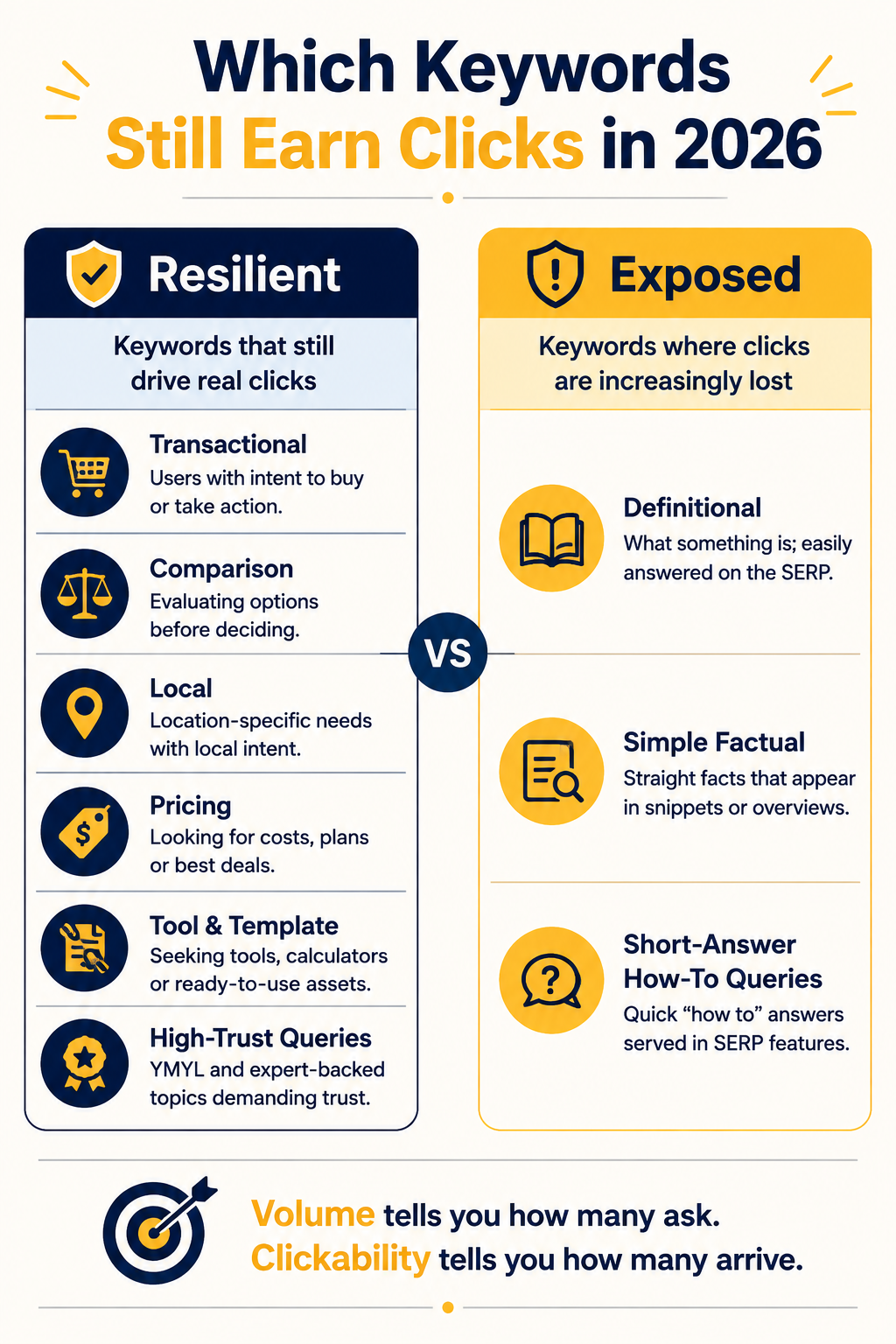
Queries That Still Produce Clicks
These share a property: the answer is either too specific, too personal, or too consequential to accept from a summary.
- Transactional and product queries: someone buying needs a page to buy on
- Comparison and alternative queries: “X vs Y,” “alternative to X” — buyers verify these against real sources
- Local queries: the searcher needs a business, not an explanation
- Pricing queries: AI answers are unreliable on price, and buyers know it
- Tool, template, and calculator queries: the deliverable is the page itself
- Queries where trust matters: medical, legal, financial decisions people won’t outsource to a summary
Queries That Mostly Don’t
- Definitional queries: “what is job costing” gets answered above the fold, every time
- Simple factual lookups: conversions, dates, formulas, single numbers
- Generic how-to with a short answer: anything resolvable in three sentences
Kestrel’s list had 40 definitional keywords on it. All got cut.
Their replacements: “quickbooks time alternative for contractors,” “construction job costing software pricing,” and “free construction timesheet template.” Lower volume on every one. Vastly higher yield.
Don’t Abandon the Exposed Ones Entirely
One nuance worth holding.
Informational keywords still matter — but their job changed. They no longer earn clicks. They earn citations, which build brand familiarity upstream of the purchase.
So don’t delete them from your strategy. Move them to a different column, with a different success metric, and stop measuring them by sessions. More on that in Step 7.
5. Map Keywords to Fan-Out, Not Single Terms
Here’s the mechanic almost nobody accounts for when selecting keywords.
When someone asks a question in AI Mode, the system doesn’t run one search. It decomposes the prompt into multiple related sub-queries — reporting on Google’s AI Mode suggests up to around 16 — runs them in parallel, and assembles an answer from whatever it retrieves.
Which means the target is no longer a phrase. It’s a question and everything that question implies.
Test a Keyword by Fanning It Yourself
Take a candidate keyword and write down every sub-question a thorough answer would need to address.
For “construction job costing software,” Kestrel’s list came out as:
- What is job costing in construction?
- How is it different from standard accounting?
- What features does job costing software need?
- How much does it cost?
- Does it integrate with QuickBooks?
- Can it handle union payroll?
- What do small contractors use versus large ones?
Seven sub-questions. If Kestrel’s page answers two of them, it competes for two fragments. If it answers all seven, it becomes a strong candidate for the whole cluster.
The same exercise on a query from a different industry, mapped onto the page it implies:
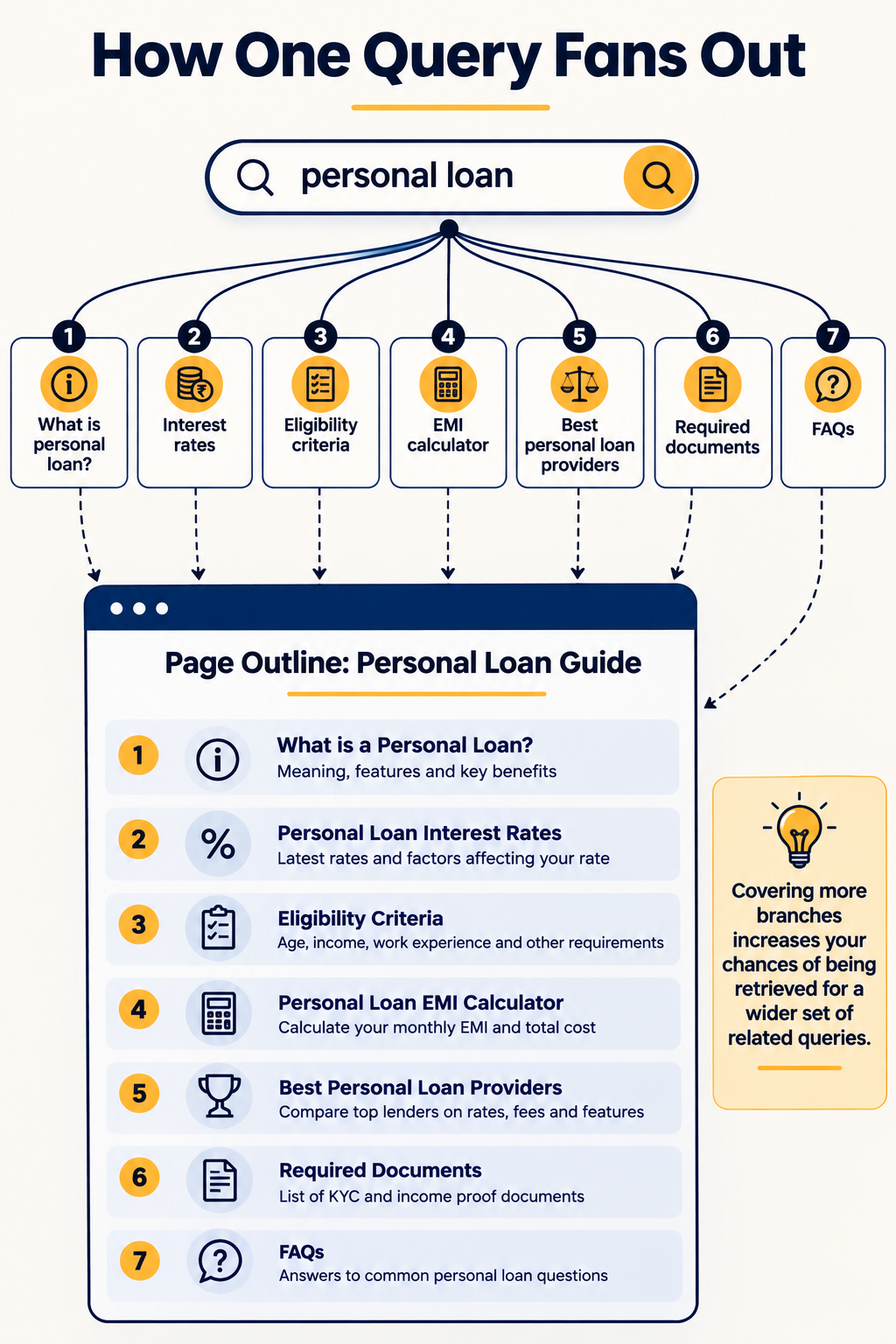
Notice that each branch becomes a section. That mapping is the whole technique.
This reframes selection. A keyword is a good target when you can genuinely cover its fan-out — not when its difficulty score looks manageable.
It also explains why thin pages built around exact-match phrases stopped working. They cover one branch of a tree with sixteen.
Pick Keywords Where Your Fan-Out Coverage Is Defensible
Kestrel can answer all seven job-costing sub-questions credibly. They’ve built the software; they know what union payroll does to a timesheet.
They cannot credibly cover the fan-out for “best construction management software,” which requires evaluating twenty products they don’t use.
Choose the clusters where your coverage is real. That constraint is a gift — it eliminates most of the list.
6. Check You Can Actually Rank
Difficulty scores are estimates, and they’re often wrong at the extremes. Use them as a first pass, then verify manually.
Three checks that beat any score:
Look at who ranks, not what the number says. Open the top ten. If eight are DR 70+ domains with dedicated pages on the exact topic, a DR 24 site is not competing there this year, whatever the difficulty score claims.
Look for a weak result in the top ten. One forum thread, one outdated post, one page that clearly doesn’t match intent — that’s your entry point. A uniformly strong top ten is a no.
Check your existing topical footprint. Sites rank more easily for topics adjacent to what they already cover. Kestrel has nine pages about timesheets and payroll, so job costing is close. Something like “construction project scheduling” is not, and would need a cluster of its own before a single page has a chance.
Then be honest about the timeline. A DR 24 site targeting a term where the weakest competitor is DR 55 is planning a twelve-month project, not a blog post.
Note
Keyword difficulty scores are calculated differently by every tool and mostly reflect backlink profiles. Two tools can give the same keyword a 22 and a 61. Treat them as a rough sort, never as a decision.
7. Build a Portfolio, Not a List
The final step is allocation, and it’s where most keyword strategies fall apart.
A list ranks keywords from best to worst and you work down it. A portfolio assigns each keyword a job, and accepts that different jobs get measured differently.
Four buckets:
- Revenue keywords: transactional and comparison terms close to purchase. Small volume, high intent. This is where most of your effort goes.
- Traffic keywords: informational terms that still produce clicks, usually because they’re specific or the answer is long. These build the audience.
- Citation keywords: definitional and short-answer terms that no longer produce clicks but do produce AI mentions. Measured by presence, not sessions.
- Defensive keywords: your brand terms and competitor comparisons. Cheap to rank for, expensive to lose.
Kestrel’s allocation: roughly half their effort on revenue keywords, a quarter on traffic, a fifth on citation, and the remainder defending brand terms.
Yours will differ. What matters is that the split is deliberate, and that you’re not measuring a citation keyword by the clicks it fails to send.
Set the Success Metric Per Bucket, Before You Publish
Revenue keywords are judged on conversions. Traffic keywords on non-branded clicks. Citation keywords on whether the brand appears in AI answers for that query. Defensive keywords on not losing position.
Decide this in advance. Otherwise every underperforming page becomes an argument six months later.
Mistakes That Waste a Year
Four failures show up repeatedly.
Choosing by volume alone. Now actively harmful rather than merely lazy, because the highest-volume terms are the ones most likely to be fully answered above the fold.
Ignoring the SERP layout. A keyword’s value depends on what sits above organic results. No tool reports this. You have to look.
Targeting one keyword per page in a fan-out world. Pages built around a single exact phrase cover one branch of a tree. Build around question clusters instead.
Treating keyword research as a one-time project. SERP layouts change, AI Overview coverage expands into new categories, and competitors publish. Re-screen your top 30 quarterly.
Copying a competitor’s list without checking their authority. A DR 78 competitor ranks for terms you cannot touch. Filter their export by what a site your size could plausibly win.
Keyword Research FAQs
Is search volume still useful in 2026?
Yes, as a rough sizing input — but not as a selection criterion.
Volume tells you the ceiling of possible demand. It says nothing about how much of that demand reaches your site, which now depends almost entirely on what the SERP looks like.
Use volume to sort. Use the live SERP to decide.
Should you still target long-tail keywords?
More than ever, but for a different reason than the old advice gave.
Long-tail queries used to be recommended because they’re easier to rank for. They now matter because they’re specific enough that an AI summary often can’t fully resolve them, and because they map cleanly onto the sub-queries a fan-out produces.
The old rationale was competition. The new one is survivability.
How many keywords should one page target?
One primary question, plus the cluster of sub-questions that question fans out into — typically five to ten.
That isn’t keyword stuffing. It’s structuring a page so each sub-question gets its own section with a direct answer, which is also what makes passages extractable.
How often should you redo keyword research?
Re-screen your top 30 targets quarterly, and run a full refresh annually.
The screening matters more than the discovery. Your candidate list doesn’t change fast, but AI Overview coverage on those candidates does, and a keyword that was worth targeting in January can be fully absorbed by June.
Do keywords still matter if AI is answering everything?
Yes, because the systems generating those answers still retrieve documents, and retrieval still depends on matching a query to relevant content.
What changed is the unit. You’re no longer optimizing a page for a phrase. You’re building content that can satisfy a set of related sub-queries well enough to be retrieved and cited.
The word “keyword” is doing less work than it used to. The underlying job — figure out what people ask, then answer it better than anyone — hasn’t changed at all.
Start With Thirty Searches
You don’t need a new tool subscription to act on this.
Take your current keyword list, sort by whatever you were using, and take the top 30. Open each one in an incognito window and note what sits above the first organic result.
Then cross-check against your own Search Console. Sort the query report by impressions and look for terms pulling hundreds of impressions and almost no clicks:
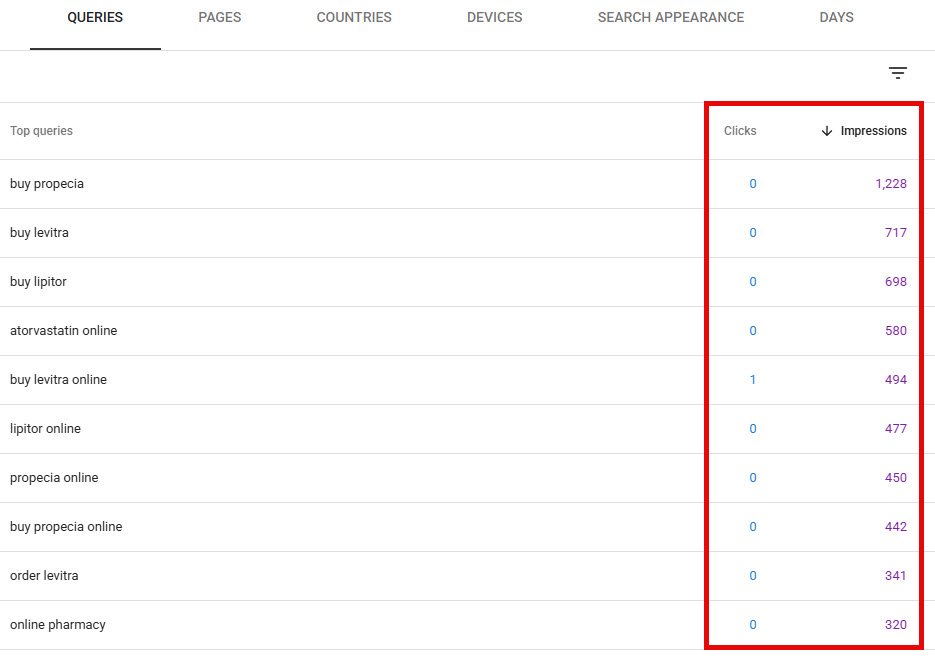
Every row like that has one of two explanations: the query is being answered before anyone reaches you, or you’re ranking too low to be seen. Check the live SERP for a handful of them and you’ll know which — and either answer changes what you target next.
An hour of that will change your content plan more than another export ever could.