

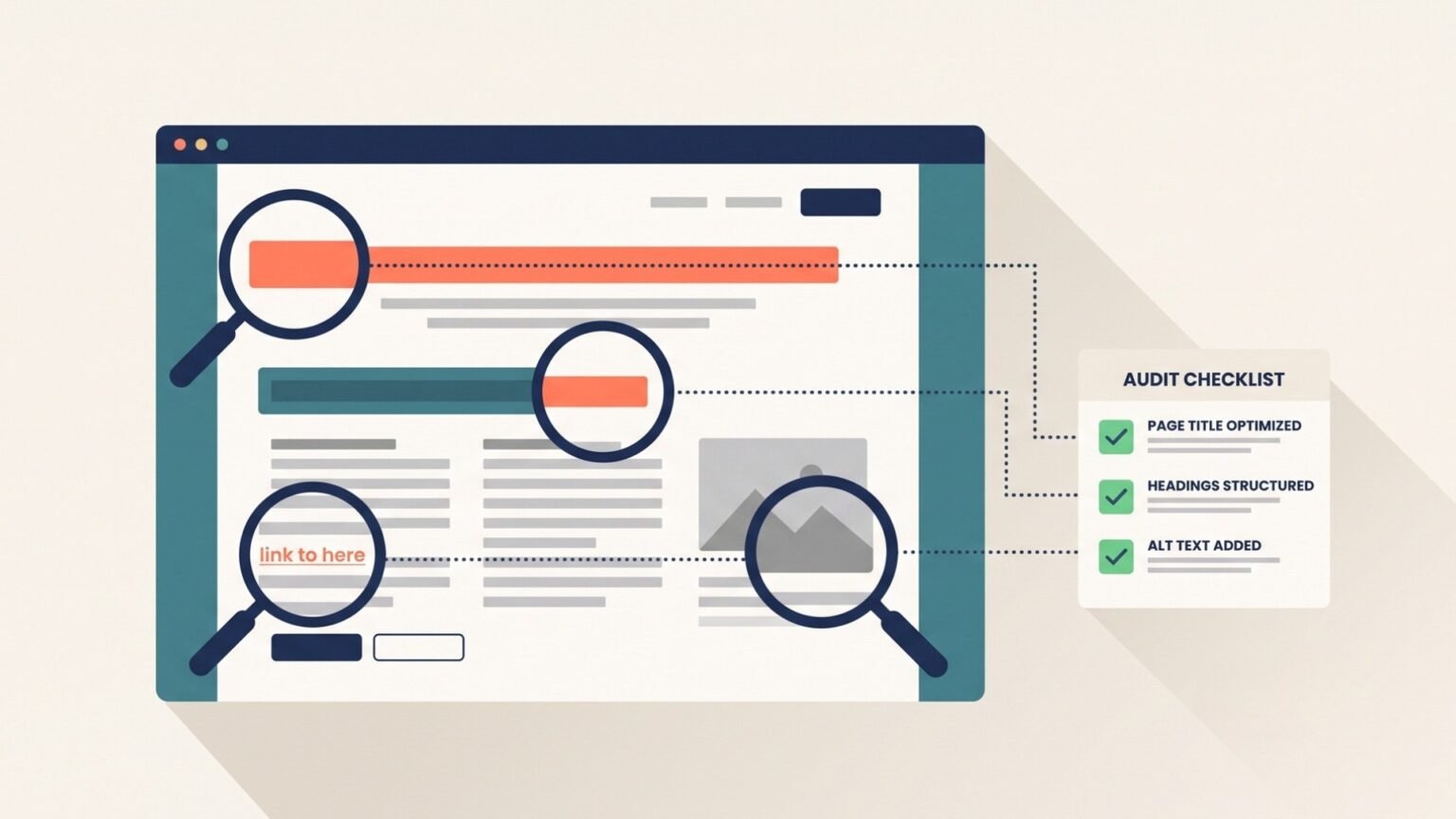
An on-page SEO audit is a page-by-page review of every element you directly control on your website — titles, headings, content, internal links, images, and structured data — to find what is stopping each page from ranking.
You run one by crawling your site, layering in Google Search Console performance data, scoring each page against a fixed standard, and then fixing the issues in order of traffic impact.
Most sites do not have a ranking problem. They have an unaudited-pages problem.
A title tag written three years ago for a keyword nobody searches anymore. A blog post with two H1s. A money page sitting five clicks from the homepage with four internal links pointing at it.
None of these are dramatic. All of them are cheap to fix.
And they are the part of on-page SEO that compounds: fix a template once, and every page built from it improves.
Unlike link building, on-page work is also entirely inside your control.
Here is what a complete on-page SEO audit covers:
- Indexability: whether the page can be crawled and indexed at all
- Metadata: title tags, meta descriptions, and how Google rewrites them
- Structure: heading hierarchy, URL slugs, and content formatting
- Content: search intent match, depth, freshness, and E-E-A-T signals
- Internal links: anchor text, crawl depth, orphan pages, and link equity flow
- Assets and markup: image optimization, schema markup, and Core Web Vitals
- Passage structure: whether your content is extractable by AI Overviews
Throughout this guide, we’ll audit one running example: Trailhead Coffee Co., a small ecommerce roaster with about 180 URLs. Their flagship blog post targets “pour over coffee ratio” — roughly 2,400 searches a month at a keyword difficulty of 21%.
It ranks position 14. It should rank top five.
Let’s find out why.
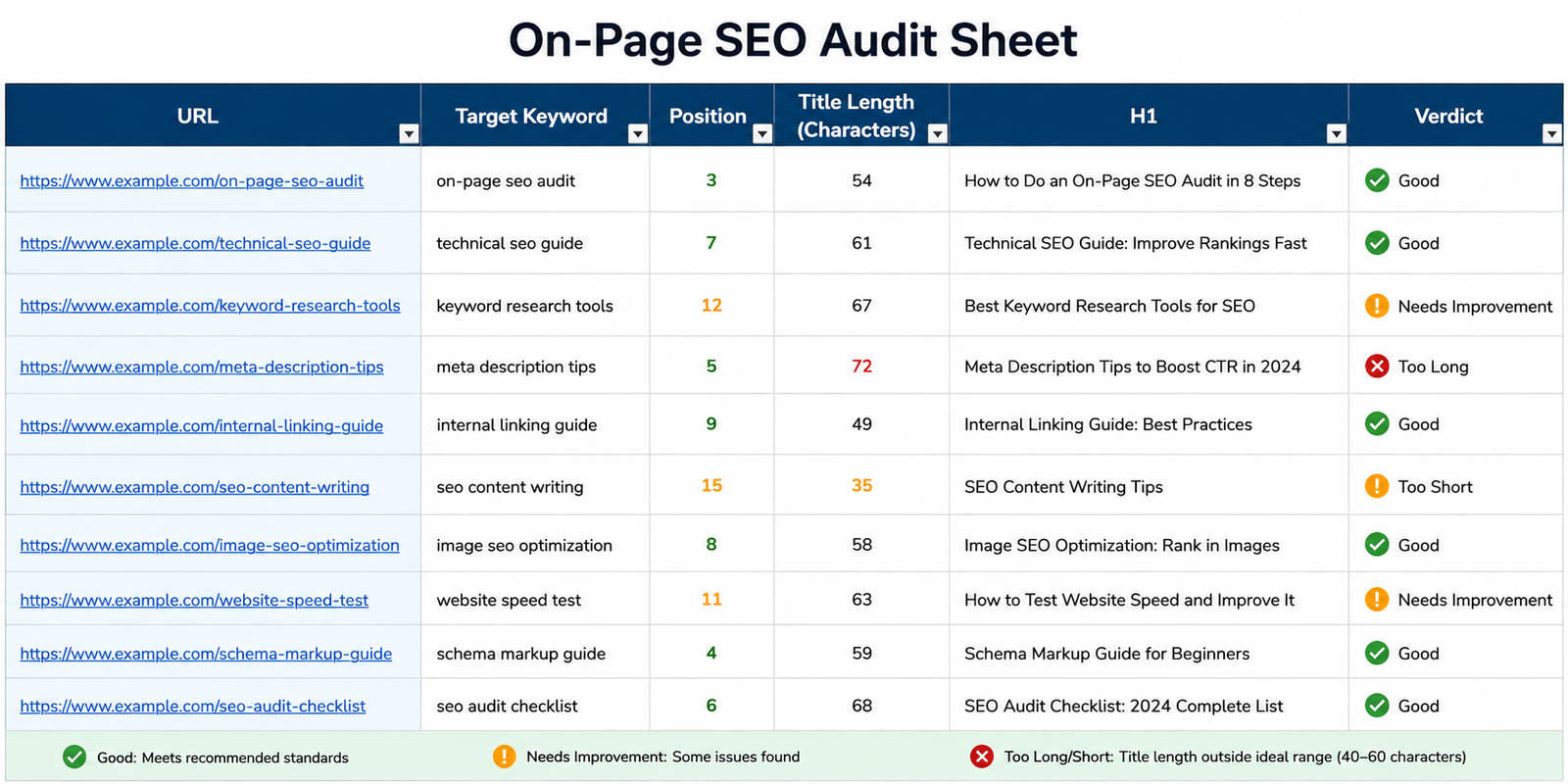
That spreadsheet is where every step below deposits its findings.
1. Build Your Audit Sheet and Crawl the Site
Start by pulling every URL on your site into one place, with the on-page elements attached to each row.
Everything after this step is filtering and judgment. If your data collection is sloppy, the whole audit inherits the sloppiness.
Crawl Your Site With a Desktop Crawler
Screaming Frog SEO Spider is the default choice here. The free version crawls up to 500 URLs, which covers most small business sites and blogs.
Before you hit “Start,” adjust two settings.
Go to “Configuration” > “Spider” > “Crawl” and enable “Follow Internal Nofollow.” This lets the crawler reach pages that are only linked with rel="nofollow" — which is exactly how orphan pages hide.
Then open the “Extraction” tab and confirm page titles, meta descriptions, H1s, H2s, and word count are all selected.
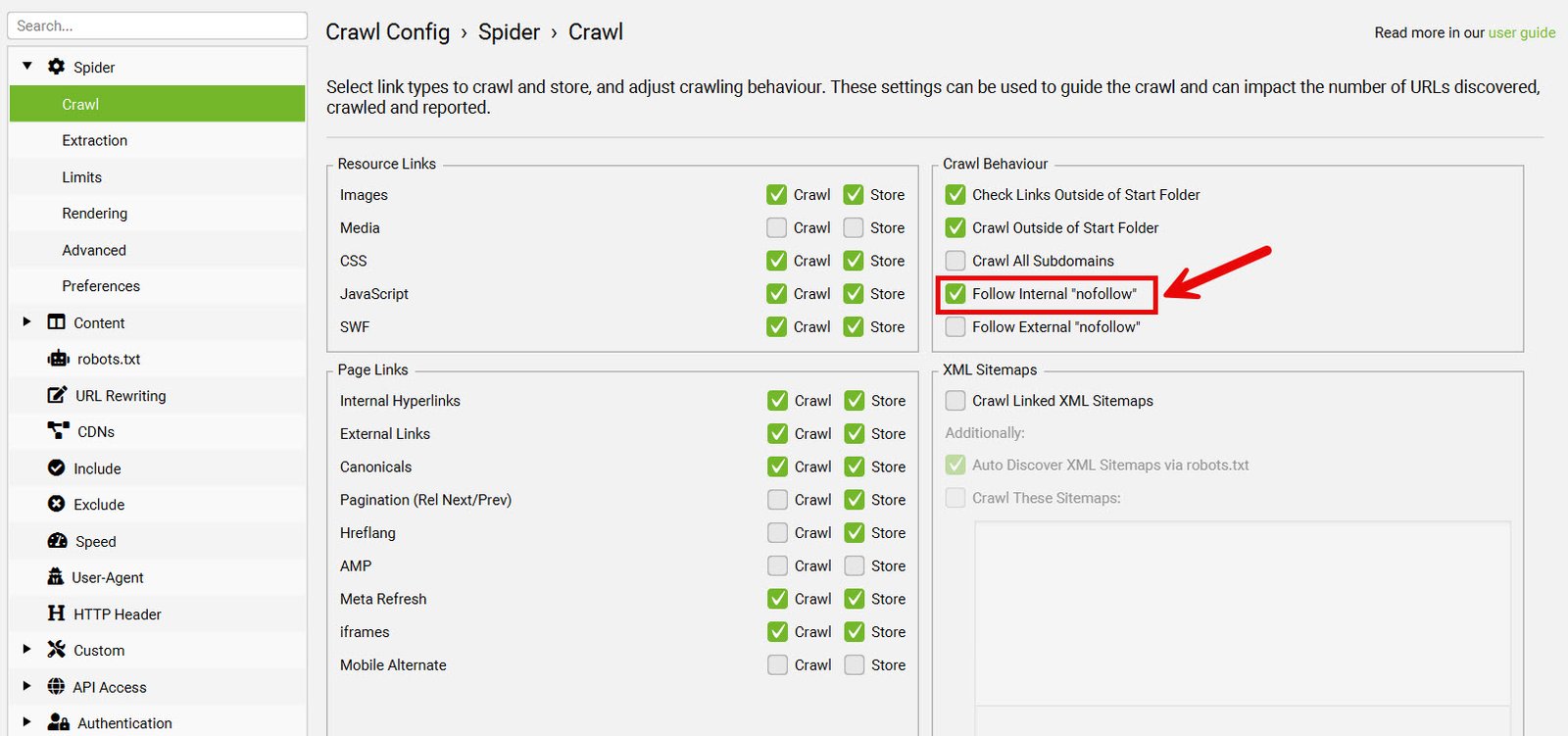
Now run the crawl. On a 180-page site like Trailhead’s, it finishes in under two minutes.
Layer In Google Search Console Data
A crawl tells you what exists. It does not tell you what earns clicks.
Open Google Search Console, go to the “Performance” report, set the date range to the last three months, and export the “Pages” tab.
Then export the “Queries” tab separately. You’ll need it in Step 5 to spot cannibalization.
Tip
Screaming Frog connects directly to the Search Console API under “Configuration” > “API Access.” Connect it before crawling and the click and impression data lands in the same export, which saves a VLOOKUP later.
Set Up the Audit Sheet
Merge both exports into one sheet, keyed on URL. Add these columns:
- Target keyword: the one query each page is actually built for
- Position, clicks, impressions, CTR: from Search Console
- Title, title length, meta description, H1: from the crawl
- Word count, inlinks, crawl depth, indexability: from the crawl
- Verdict: keep, optimize, consolidate, or remove
That last column is the one that matters. Every page ends the audit with exactly one verdict.
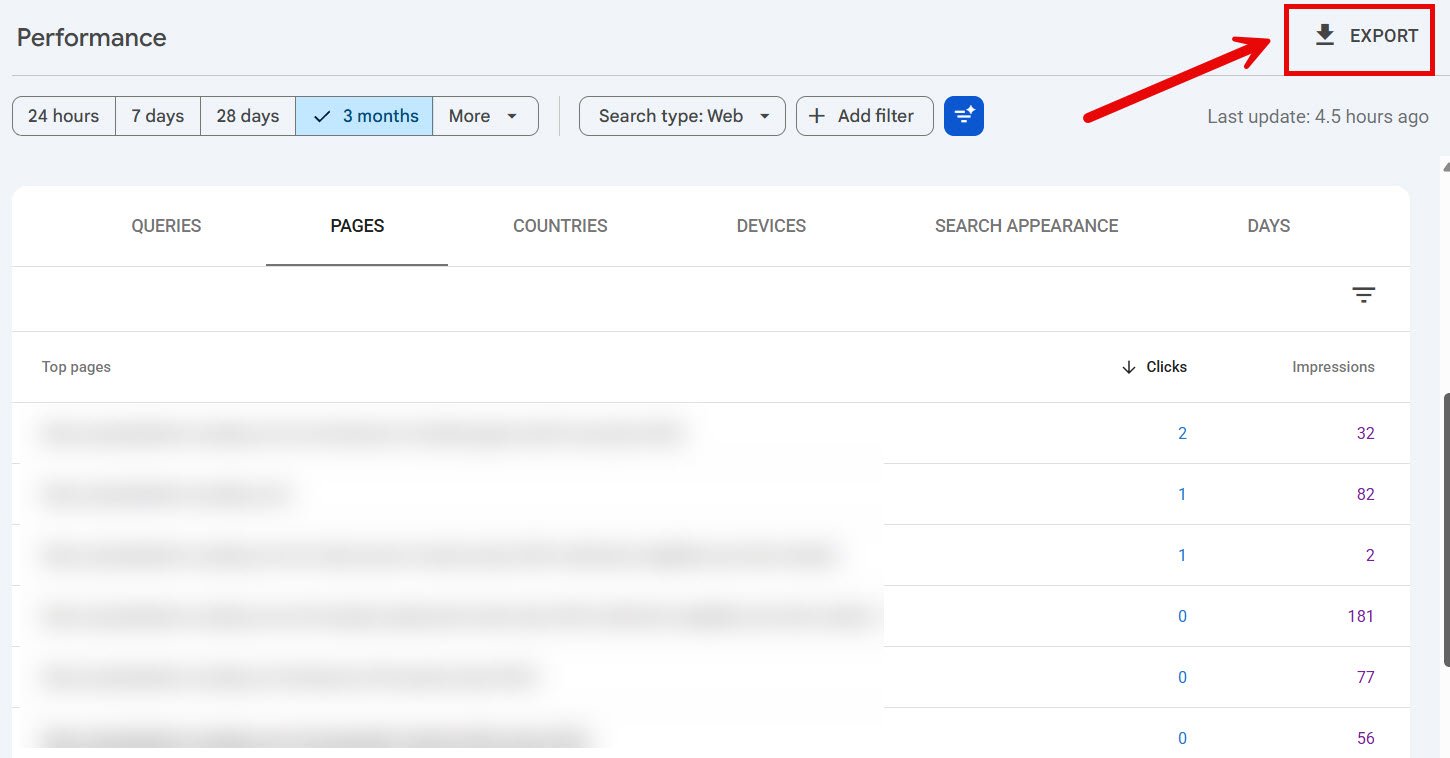
Export both tabs before you merge anything — the Queries tab is what exposes cannibalization later.
Now segment. Trailhead’s 180 URLs break into four groups: 42 product pages, 8 collection pages, 61 blog posts, and 69 utility URLs like tag archives and pagination.
Audit the money pages and blog posts closely. Utility URLs mostly need an indexability decision and nothing more.
2. Confirm Your Pages Can Be Crawled and Indexed
Check indexability before you touch a single title tag.
Why?
Because optimizing the metadata on a noindexed page is decorating a room nobody can enter.
Sort your crawl by the “Indexability” column and look at everything marked non-indexable. For each one, ask a single question: is this deliberate?
Here’s what usually turns up:
- Accidental
noindextags: often left behind after a staging environment goes live - Canonical tags pointing elsewhere: a page canonicalized to a similar URL never ranks on its own
- Blocked in robots.txt: check
/robots.txtfor overly broadDisallowrules - Orphaned but indexable: the page can be indexed, but nothing links to it
Trailhead’s audit surfaced a real one. Their “Single Origin” collection page — the highest-margin category on the site — carried a canonical tag pointing at /collections/all.
It had been invisible for eight months.
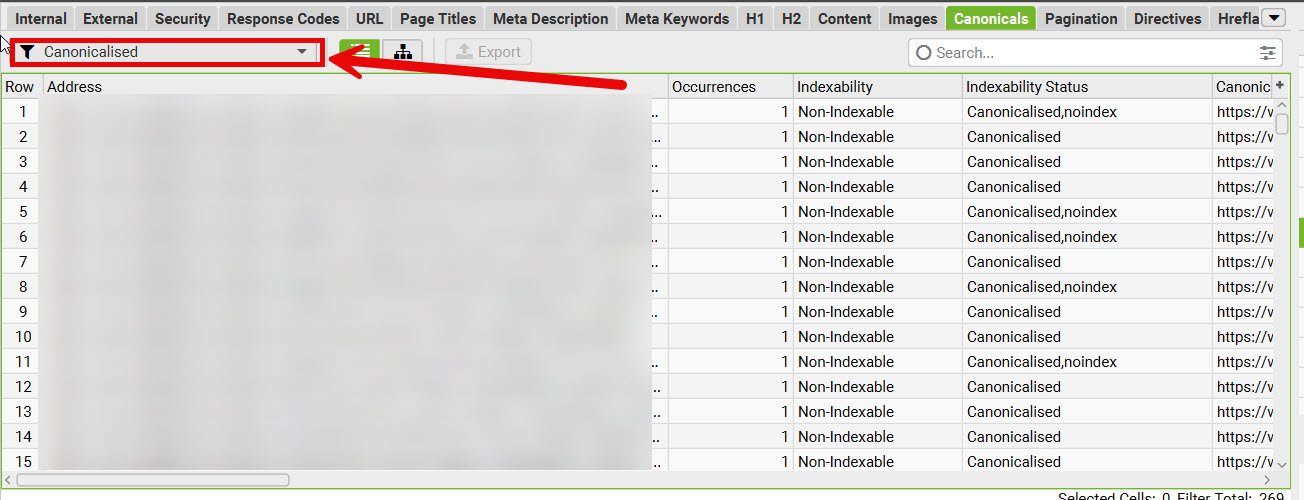
Cross-check against reality in Search Console. Open the “Pages” report under “Indexing” and review the “Why pages aren’t indexed” section.
Then spot-check three or four important URLs with the URL Inspection tool. It shows you the version Google actually has, which sometimes differs from what your crawler sees.
Note
“Discovered — currently not indexed” is usually a quality or internal linking signal, not a technical error. Fixing it means giving the page more internal links and better content, not editing a meta tag.
3. Audit Title Tags and Meta Descriptions
Your title tag is the single highest-leverage on-page element, because it does two jobs at once: it tells Google what the page is about, and it decides whether anyone clicks.
Google confirms in its own documentation that the text inside the <title> element is used for ranking — whether or not Google chooses to display it as the title link in search results.
So a weak title costs you twice.
Filter Your Crawl for Title Problems
In Screaming Frog, open the “Page Titles” tab. The filter dropdown gives you the whole audit in six clicks: Missing, Duplicate, Over 60 Characters, Below 30 Characters, Multiple, and Same as H1.
Work through them in that order.
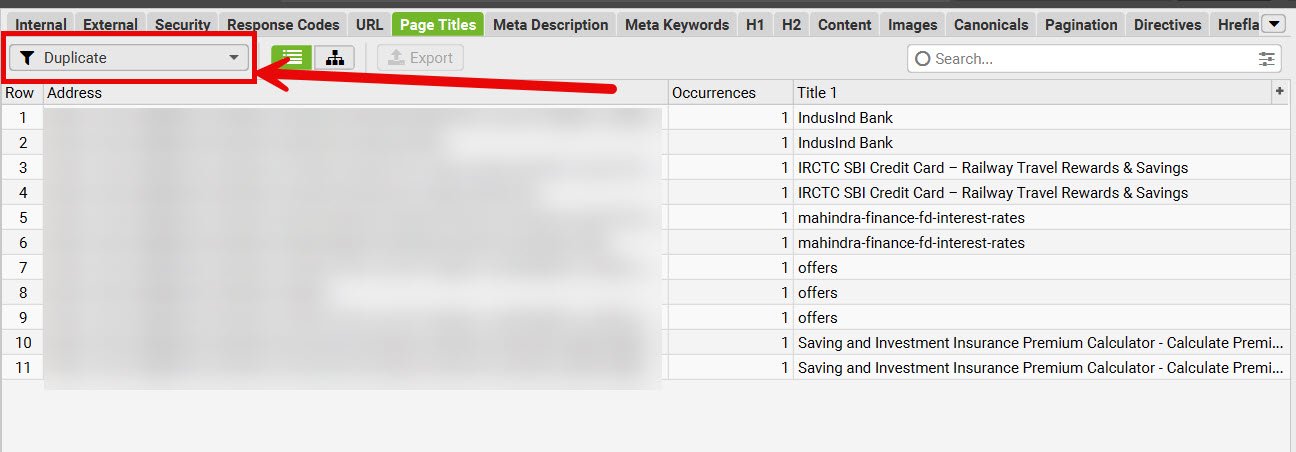
Duplicates are the priority. Two pages with the same title are two pages competing for the same slot, and Google has to guess which one you meant.
Here is the standard to hold each title against:
- Length: 50 to 60 characters, or under roughly 600 pixels
- Uniqueness: no two pages on the site share a title
- Keyword position: primary term as close to the front as reads naturally
- Alignment: the title and the H1 describe the same thing
- No boilerplate stuffing: one brand suffix, not a keyword list
Trailhead’s post was titled “Coffee Ratios | Trailhead Coffee Co. | Fresh Roasted Coffee Beans Online.” That’s 71 characters, half of it brand, and the actual topic is two words long.
The rewrite: “Pour Over Coffee Ratio: The Golden Ratio Chart (2026).” 53 characters, keyword first, a promise of a specific asset.
Find the Titles Google Is Rewriting
Google replaces title links when the supplied title is vague, keyword-stuffed, duplicated across a template, or when the page has multiple competing prominent headings.
You can spot rewrites without a tool. Search site:yourdomain.com and compare the displayed titles against your crawl export.
Every mismatch is Google telling you your title was not the best description of the page.
That’s free feedback. Use it.
Rewrite Meta Descriptions With CTR Data
Meta descriptions are not a ranking factor. Google says so directly, and it generates snippets from page content whenever it thinks that serves the query better.
They still decide clicks.
Rather than rewriting all 180, target the pages where the gap is measurable. In your audit sheet, filter for pages with more than 1,000 impressions and a CTR below 2%.
Those are pages Google already shows to people who then choose something else.
Write those descriptions like ad copy: 140 to 160 characters, lead with the specific benefit, include the query terms naturally so they bold in the SERP, end with a reason to click.
4. Fix Your Heading Structure and URL Slugs
Headings are the skeleton Google reads to understand how your page is organized. They are also, increasingly, the boundaries along which AI systems slice your content into passages.
Get them wrong and both audiences lose the thread.
Audit Your H1 and Subheading Hierarchy
Open the “H1” tab in your crawl and run three filters: Missing, Duplicate, and Multiple.
Every page needs exactly one H1. It should describe the page’s topic in plain language and can run slightly longer than the title tag, since nothing truncates it.
Then check the H2s for sequence. A page that jumps from H2 straight to H4, or wraps a sidebar widget in an H2, sends a confused structural signal.
Here’s the pattern to aim for on Trailhead’s post:
- H1: Pour Over Coffee Ratio: The Golden Ratio Chart
- H2: What Is the Golden Ratio for Pour Over Coffee?
- H2: How to Measure Your Coffee-to-Water Ratio
- H3: Using a Scale
- H3: Using Scoops and Cups
- H2: How to Adjust the Ratio for Taste
Notice that the H2s are phrased as questions. That is not decoration — it maps your sections to the way people actually type queries, which matters a great deal in Step 8.
Check URL Slugs Against the Basics
Good slugs are short, lowercase, hyphen-separated, and describe the page without needing the rest of the URL.
Scan your crawl’s “URL” tab for the usual offenders: underscores, uppercase letters, dates that will age badly, session parameters, and slugs longer than about five words.
Trailhead had /blog/2021/07/how-to-get-the-perfect-coffee-to-water-ratio-for-pour-over-coffee-at-home.
Better: /blog/pour-over-coffee-ratio.
Note
Only change a URL when the gain clearly outweighs the risk, and always 301 redirect the old one. A slug rewrite on a page with strong rankings is rarely worth it.
5. Score Every Page Against Search Intent
This is the step most audits skip, and it’s the one that moves rankings.
A page can pass every technical check and still fail, because it answers a different question than the one being asked.
Classify the Intent, Then Check the SERP
Every target keyword falls into one of four buckets:
- Informational: the searcher wants to learn something
- Commercial: the searcher is comparing options before buying
- Transactional: the searcher is ready to act
- Navigational: the searcher wants a specific site or page
Do not classify from the keyword alone. Open an incognito window, search the term, and look at what Google is actually rewarding.
For “pour over coffee ratio,” the top ten are all short guides with a ratio chart near the top. Not one is a product page.
Trailhead’s post buried its chart under 900 words of brewing history.
That is an intent mismatch, and no title tag fixes it.
The pattern across the top ten is the brief: chart first, explanation after.
Compare Depth Against What Ranks
Once the format matches, check coverage. Open the top five results and list the subtopics each one covers.
Anything covered by four of the five and missing from your page is a gap.
For Trailhead: grams-per-cup conversions, a ratio-to-taste troubleshooting table, and guidance for different brewer types. All present in the top results. All missing from their post.
Depth is not word count. It is question coverage.
Look for Content Decay and Stale Facts
Pull up the Search Console “Pages” report and compare the last three months to the same period a year ago.
Pages that lost 30% or more of their clicks — a pattern known as content decay — without an obvious seasonal reason are decaying. Usually the cause is a competitor publishing something fresher, or facts on your page going out of date.
Check dates in the copy, screenshots of tool interfaces that have since been redesigned, and any statistic older than two years.
Hunt Down Keyword Cannibalization
Keyword cannibalization is two or more of your pages competing for the same query, splitting the signals between them.
Find it with the Queries export from Step 1. Filter to a single query, then check how many of your URLs receive impressions for it. If two URLs trade positions across weeks for the same term, you’ve found a pair.
Trailhead had three: a blog post, a brewing guide, and a product description all chasing “coffee to water ratio.”
The fix is one of three moves. Consolidate the weaker pages into the strongest and 301 redirect. Or differentiate them so each targets a distinct query. Or deindex the ones that serve no search purpose.
Tip
Sort the competing URLs by clicks, not by position. The page with the most clicks usually deserves to be the survivor, even if another one occasionally ranks higher.
Audit Your E-E-A-T Signals
Experience, expertise, authoritativeness, and trustworthiness are not a score you can query. They are signals a reader can verify.
Check each important page for:
- A named author with a real bio and relevant credentials
- First-hand evidence: original photos, test results, or specifics only a practitioner would know
- Cited sources linking out to primary references, not aggregators
- A visible published or updated date
- Reachable contact and policy pages from the same template
Trailhead’s post had no byline. Adding one — with a line about the author cupping coffee professionally for nine years — costs an afternoon and changes how the page reads to both humans and quality raters.
6. Audit Internal Links and Anchor Text
Internal links do two things: they route crawlers to your pages, and they tell those crawlers what each page is about via anchor text.
Most sites under-use them badly.
Find Orphan Pages and Deep Pages
In Screaming Frog, open “Site Structure” and check the crawl depth distribution. Anything more than three clicks from the homepage is hard for both users and crawlers to reach.
Then open the “Internal” tab and sort by the “Inlinks” column, ascending.
Pages with zero inlinks are orphans. Pages with one or two on a site of your size are close enough to orphaned to matter.
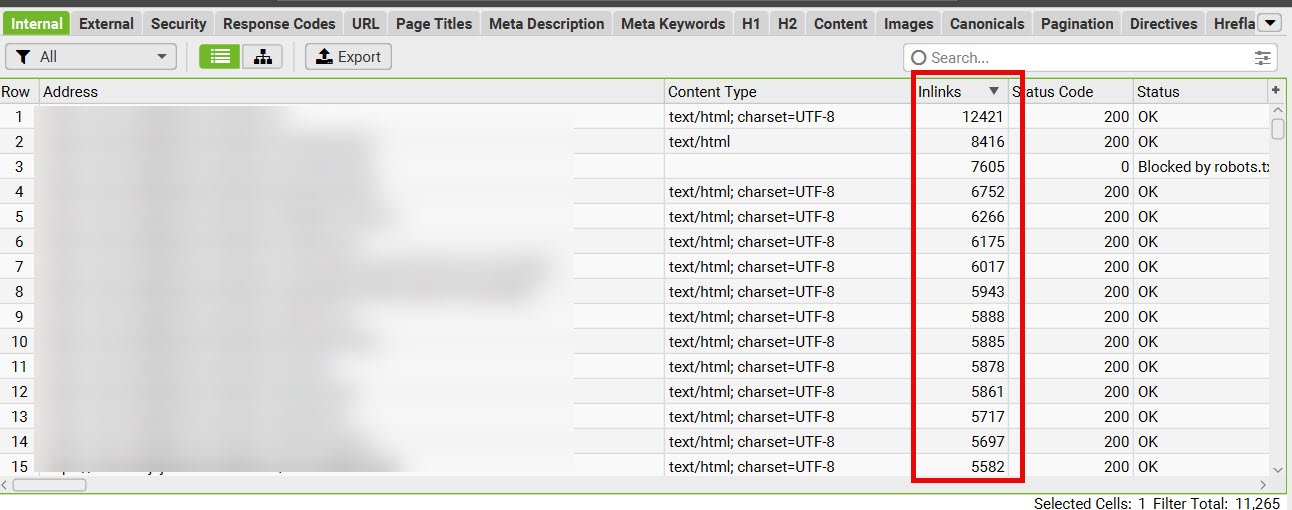
Trailhead’s “Single Origin” collection had four inlinks. Their “About Us” page had 178, because it sits in the footer.
That ratio is exactly backwards.
Check Anchor Text Quality
Open the “Anchor Text” tab and look for the vague ones: “click here,” “read more,” “this article,” “learn more.”
Each of those is a link that passes equity without passing context.
Rewrite them onto the natural noun phrase. Link the words “pour over coffee ratio,” not the words surrounding them.
A workable guideline is three to five internal links per 1,000 words, all descriptive, all pointing somewhere genuinely relevant.
Verify the Links Are Actually Crawlable
Google follows links that use a standard <a> tag with an href attribute. Links built purely in JavaScript, buttons with click handlers, and empty anchors may not be followed at all.
Check the “Response Codes” tab for internal links returning 404s or chaining through multiple redirects. Both waste crawl budget and leak equity.
Then plan the fix as a linking pass, not a one-off. Pick your five most important commercial pages and add links to each from your highest-traffic blog posts, using descriptive anchors.
7. Audit Images, Schema, and Page Experience
These three sit slightly outside the content itself, but they run through the same crawl export, and they affect the same rankings.
Optimize Images for Speed and Context
Open the “Images” tab and filter for “Missing Alt Text” and “Over 100 KB.”
For each image on a page that matters:
- Descriptive filename:
pour-over-ratio-chart.webp, notIMG_4471.jpg - Alt text that describes the image, written for a person who cannot see it
- Modern format: WebP or AVIF, with a JPEG fallback where needed
- Explicit width and height attributes, so the browser reserves the space
- Lazy loading on everything below the fold, and nothing above it
That fourth point is the one people miss. Images without dimensions are one of the most common causes of layout shift.
Validate Your Structured Data
Schema markup does not make you rank higher. It makes you eligible for rich results, and it helps search systems parse what your page contains.
Audit for the types that fit your page: Article for blog posts, Product and Offer for product pages, BreadcrumbList for hierarchy, Organization for the site as a whole, FAQPage where you have genuine questions and answers.
Use JSON-LD. Validate with Google’s Rich Results Test and the Schema Markup Validator.
One rule governs all of it: the markup must reflect content that is visible on the page. Marking up a review that a visitor cannot see is a policy violation, not a shortcut.
[IMAGE: Google Rich Results Test showing a validated Article schema block with detected properties]
[ALT: google rich results test showing valid article structured data with detected properties]
Check Core Web Vitals on Real Users
Three thresholds define a good experience:
- Largest Contentful Paint (LCP): 2.5 seconds or less
- Interaction to Next Paint (INP): 200 milliseconds or less
- Cumulative Layout Shift (CLS): 0.1 or less
Open the “Core Web Vitals” report in Search Console. It shows field data from actual visitors, grouped by URL pattern, which is more useful than a lab score from a single test run.
[IMAGE: Search Console Core Web Vitals report showing URL groups split into good, needs improvement, and poor]
[ALT: search console core web vitals report with url groups split by good and poor status]
The grouping matters more than any single URL: Search Console clusters pages that share a template, so one fix clears a whole bucket.
Then run PageSpeed Insights on one representative URL per template. Fixing a template fixes every page built from it.
Check mobile separately. It is usually where the failures are.
8. Structure Your Passages for AI Overviews
Google’s AI Overviews assemble answers from multiple pages, then cite the sources. Getting cited is now a distinct on-page objective.
The mechanism is two-layer. Google runs its normal ranking process to build a pool of candidate pages, then a language model reads those pages and pulls the specific passages that answer the query.
Which means the unit of optimization has changed. You are no longer optimizing a page for a click. You are optimizing passages for extraction.
Google has said there is no special markup or setting for AI Overviews — the requirement is to be indexable and useful. What follows are structural choices that make your content easier to extract.
Lead Every Section With a Self-Contained Answer
Under each H2, put a direct answer in the first 40 to 80 words. Then elaborate.
Self-contained is the operative word. The passage should make sense to someone who never read the paragraph above it, which means no “as mentioned earlier,” no pronouns pointing backwards, no unexplained “this.”
Weak opening: “This depends on a few things, which we’ll cover below.”
Strong opening: “The standard pour over coffee ratio is 1:16 — one gram of coffee for every 16 grams of water. For a 350 ml cup, that means about 22 grams of coffee.”
The second one can be lifted whole. The first one cannot be lifted at all.
The layout on the left produces a clean candidate passage. The one on the right produces nothing an extraction layer can use.
Phrase Headings the Way People Search
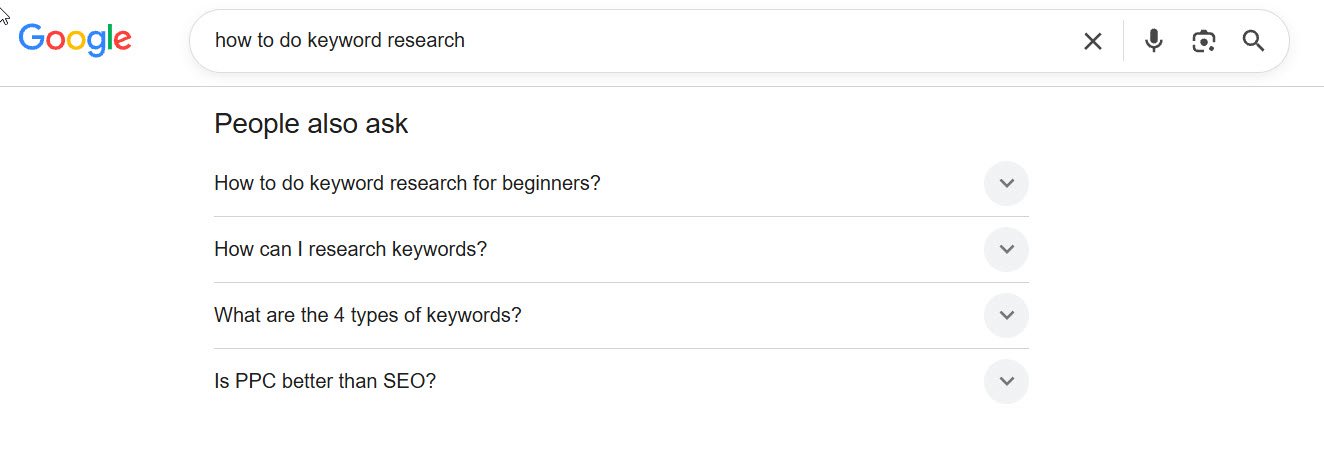
Pull the “People Also Ask” questions for your target keyword and the related queries from Search Console. Then shape your H2s and H3s to match them.
“How Much Coffee Per Cup for Pour Over?” outperforms “Measurement Considerations” — not because of keywords, but because it maps a section to a question a system is trying to answer.
Carry Specific, Attributable Facts
AI systems cite the source of a fact, not the page that repeats it.
So give each important section something concrete: a number, a measurement, a test result, a dated finding with its source named in the sentence. Vague claims get summarized without attribution. Specific ones get cited.
Original data is the strongest version of this. If Trailhead brewed the same beans at five ratios and published the tasting notes, that table becomes a citable asset no competitor can copy.
Keep Formatting Scannable
The extraction layer slices content along structural boundaries. Clean boundaries produce clean candidate passages.
That means short paragraphs, descriptive subheadings, bulleted lists for parallel items, and tables for genuine comparisons.
It also means freshness. On any topic where the answer can change, a visible recent update date matters more than it used to.
Note
Ranking in the top ten is no longer a reliable prerequisite for being cited. Recent analyses have found a substantial share of AI Overview citations coming from pages ranking well outside the first page, because Google breaks one query into several sub-queries and pulls the best passage for each. Passage quality can outrun page position.
Turn the Audit Into a Prioritized Fix List
An audit that produces 200 findings and no order of operations produces nothing.
Score each finding on two axes: expected traffic impact and effort to implement. Then work the quadrants.
Here’s the order that usually holds:
- Fix first: indexability blocks and canonical errors on pages that should rank
- Fix next: intent mismatches and cannibalization on pages with existing impressions
- Then: title and H1 rewrites on high-impression, low-CTR pages
- Then: internal linking passes to your money pages
- Last: image, schema, and formatting cleanup at template level
Set a re-crawl date four to six weeks out. Run the identical crawl configuration, and compare the issue counts side by side.
If the numbers did not move, the fixes did not ship.
On-Page SEO Audit FAQs
How often should you do an on-page SEO audit?
Run a full audit twice a year on most sites, and quarterly if you publish heavily or run ecommerce.
Between full audits, run a lightweight monthly check: new pages crawled, Search Console coverage errors reviewed, and decaying pages flagged.
Anything that changes your templates — a redesign, a theme update, a CMS migration — triggers an audit regardless of the calendar.
How long does an on-page SEO audit take?
For a site under 500 URLs, budget one to two days. The crawl takes minutes; the judgment calls take the rest.
Larger sites scale by template rather than by page. A 10,000-page ecommerce site might have six page templates, and auditing one representative URL per template covers most of the ground.
Can you do an on-page SEO audit for free?
Yes, for a small site. Screaming Frog’s free tier covers 500 URLs, Google Search Console is free, and so are PageSpeed Insights and the Rich Results Test.
What you lose is scale and historical tracking. Paid tools mostly buy you scheduling, larger crawls, keyword position data, and the ability to compare crawls over time.
Start free. Upgrade when the manual work starts costing more than the license.
What’s the difference between an on-page SEO audit and a technical SEO audit?
An on-page audit reviews the content and markup of individual pages: titles, headings, copy, internal links, images, and schema.
A technical audit reviews the infrastructure underneath: crawl budget, site architecture, server responses, rendering, sitemaps, and security.
They overlap at indexability, which is why Step 2 exists. In practice, most teams run them together.
Where to Start Tomorrow
There is a lot to check here, and no site passes everything.
So don’t start with the checklist. Start with the twenty pages that already earn impressions in Search Console but sit in positions 8 through 20.
Those pages have already proven Google finds them relevant. They’re one intent fix, one title rewrite, and three internal links away from the traffic you’re missing.
Crawl those twenty first. The other 160 can wait a week.