


Yes. Duplicate Yelp listings can hurt your local SEO — but not for the reason most articles on this topic give you.
Google does not penalize your website because a directory has two pages for you. What happens is quieter: your reviews split, your business data starts contradicting itself, and search engines lose confidence about which version of you is real.
The result is a business that looks smaller and less certain than it is.
Take a two-dentist practice that moved six blocks in 2023 and never closed its old Yelp page. It now has two: one with 61 reviews, a 4.5-star average, and a dead address. Another with 12 reviews, the correct address, and nobody claiming it.
That’s 73 reviews of real reputation, showing up nowhere.
We’ll come back to this practice throughout — call it Fernwood Dental. Here’s what the guide covers:
- The mechanism: what duplicates actually do to your signals
- The blast radius: how one Yelp page spreads errors to Apple Maps and beyond
- The real cost: why bookings suffer before rankings do
- Detection and repair: finding duplicates, then merging them properly
Can Duplicate Yelp Listings Affect SEO?
A duplicate Yelp listing is a second Yelp page for a business location that already has one. It affects SEO by dividing the review, engagement, and citation signals that would otherwise accumulate on a single page — and by feeding search engines conflicting information about your name, address, and phone number.
That’s the whole mechanism. No penalty is involved.
This distinction matters more than it sounds. If you think Google is punishing you, you’ll go hunting for a spam problem. If you understand it as a division problem, you’ll go hunting for the second ledger — which is the thing you can actually fix.
Google’s own local ranking documentation names three factors: relevance, distance, and prominence. Prominence covers how well-known a business appears, drawing on reviews, mentions, and citations across the web.
Duplicates attack prominence directly.
Fernwood doesn’t have a 73-review practice in Google’s eyes. It has a 61-review practice and a 12-review practice that might be competitors, might be the same place, and definitely disagree about where they are.
Note
Duplicate Yelp listings are not the same problem as duplicate Google Business Profiles. Google merges or suspends duplicate profiles under its own guidelines. A Yelp duplicate is a third-party data problem that reaches Google indirectly, through citations.
The Division Problem, in Three Parts
Here’s how one extra page turns into three separate signal failures:
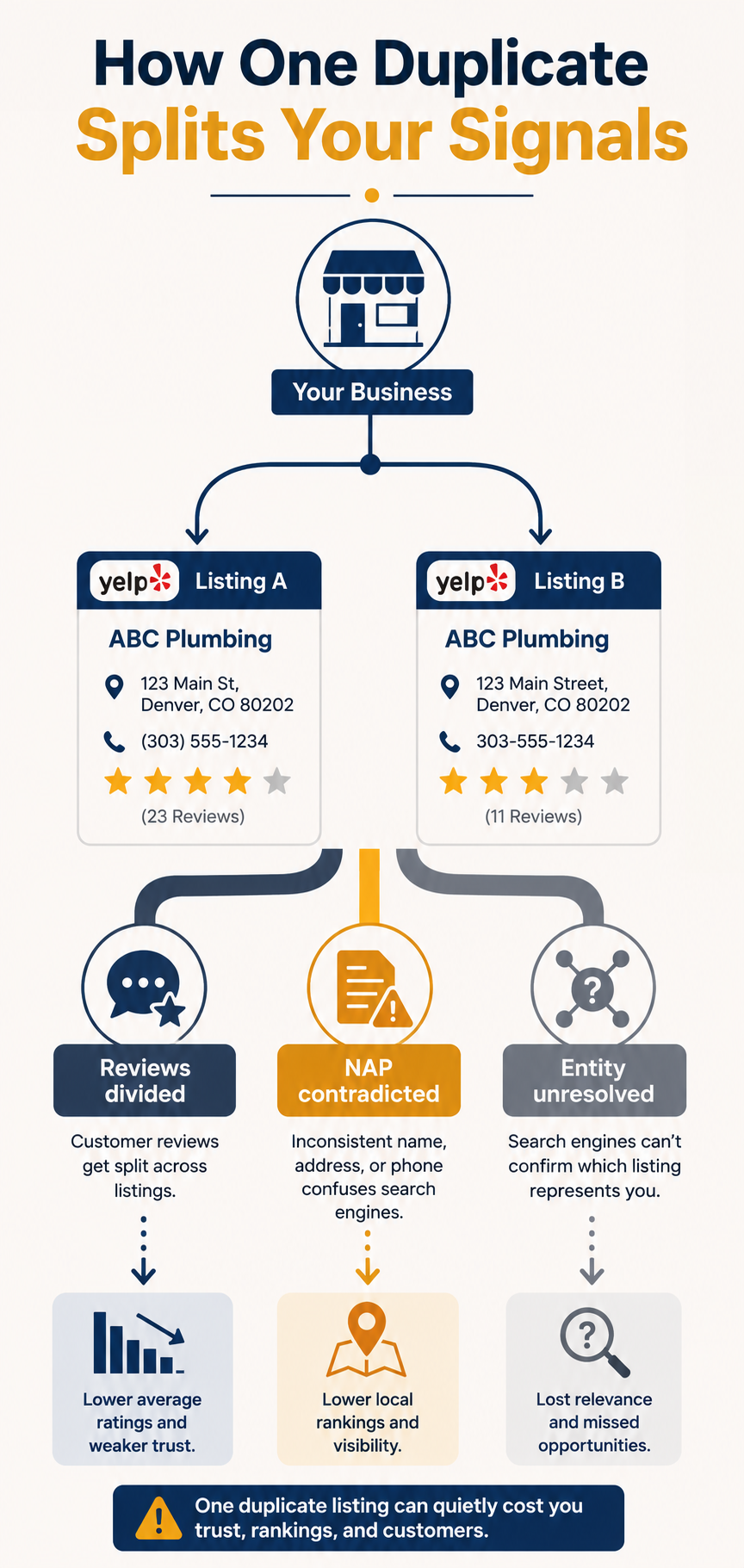
Each branch does its own damage. Take them one at a time.
Your Review Signal Gets Halved
Reviews feed prominence. Volume, average rating, and recency all matter.
Split them and every number gets worse.
Fernwood’s true position is 73 reviews at roughly 4.4 stars. What search engines see is a 61-review page and a 12-review page. Neither reflects the practice.
The recency damage is subtler and worse. New patients who find the unclaimed page leave reviews there, so the original page — the one holding all the history — slowly stops receiving fresh reviews.
To a system watching review velocity, that reads as a practice losing momentum.
Your NAP Starts Contradicting Itself
NAP stands for name, address, and phone number. Consistency across citations is one of the oldest signals in local SEO, and it’s still load-bearing.
When Yelp publishes two addresses for one practice, it isn’t only Yelp that’s wrong.
Yelp is a source other platforms read from. So the contradiction travels.
Your Business Entity Stops Resolving Cleanly
Search engines don’t index businesses as pages. They resolve them into entities — a single node with attributes attached to it.
Two Yelp pages with different addresses hand that process a hard problem: one business with bad data, or two businesses that happen to share a name?
When the system can’t decide confidently, it hedges. And hedging in local search looks like ranking lower, or surfacing for fewer queries.
Tip
Search your business name in Google and look at the Knowledge Panel. If the phone number or address there doesn’t match your primary Yelp page, you’re watching entity confusion happen in real time.
The Part Most Guides Miss: Yelp Is a Data Supplier
Almost every article on this topic treats a Yelp duplicate as a Yelp problem.
It isn’t.
Yelp isn’t only a destination site — it’s a syndication source. In the US and Canada, Apple Maps has long drawn business ratings and reviews from Yelp, and Yelp maintains content relationships across Bing, Yahoo, MapQuest, and Amazon’s Alexa, plus in-car navigation systems.
Which means your duplicate doesn’t stay put.
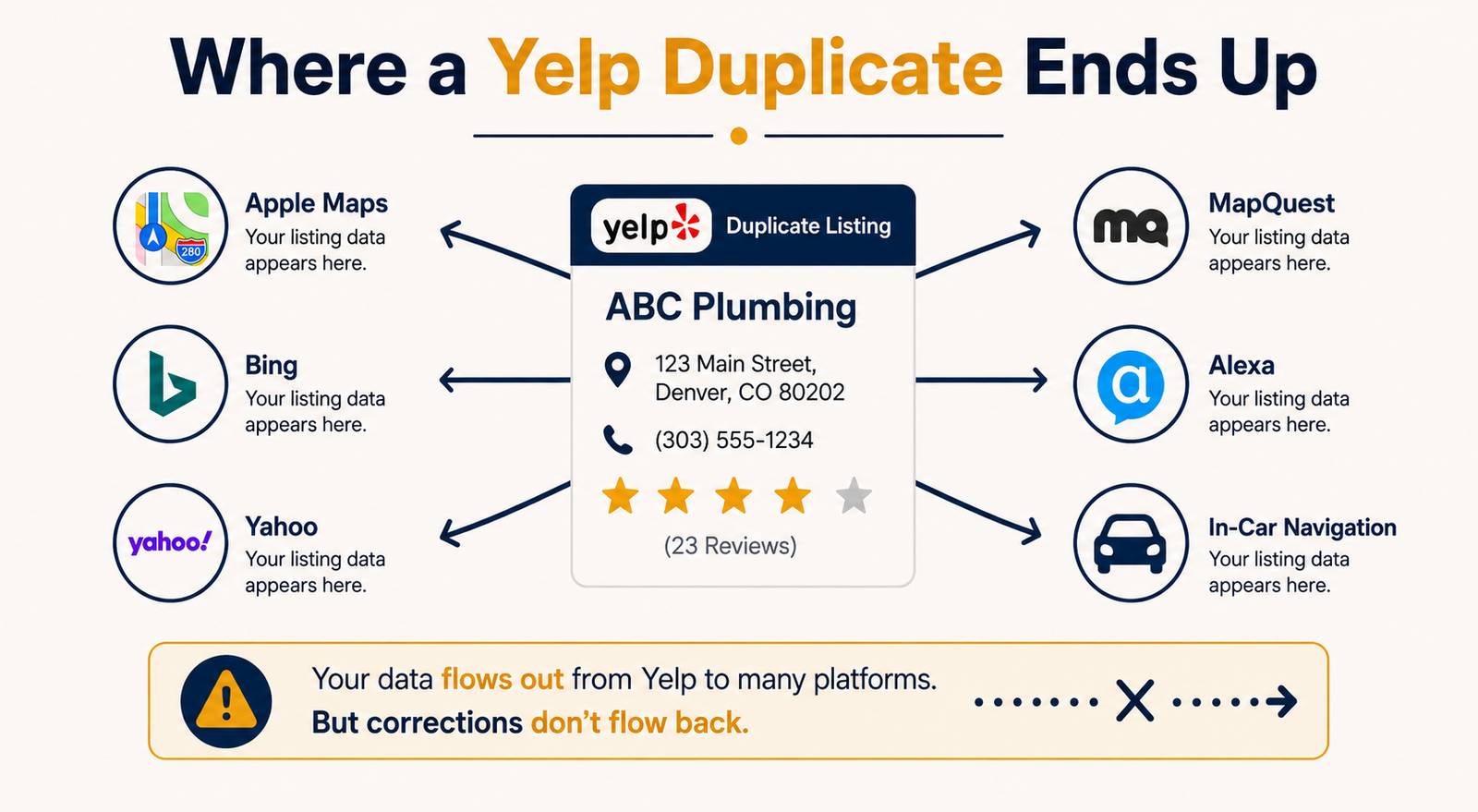
The arrows only run one way. Fix Yelp and you fix the source; leave it broken and every downstream platform inherits the same split.
For Fernwood, that means an iPhone user asking Siri for a dentist may get the 12-review version. Or the correct rating attached to an address they can no longer visit.
Google is the platform everyone worries about. It’s often not the one doing the most damage.
The Cost Shows Up in Bookings Before Rankings
Here’s the uncomfortable part.
Ranking damage from a single duplicate is usually modest — a position or two in the map pack, sometimes nothing measurable at all.
The revenue damage is immediate and total.
A patient lands on the unclaimed page, sees 12 reviews instead of 73, sees no photos, sees no owner responses, and books the practice down the street. That’s not a ranking loss. That’s a lost patient, on day one, every day the duplicate exists.
So if you’re deciding how urgently to fix this, don’t model it as an SEO problem.
Model it as a share of your Yelp traffic landing on a worse version of your business.
Is It Actually a Duplicate?
Not every second Yelp page is one. Yelp’s own policy is that a business location should be listed once, with each separate location getting its own page.
So the test isn’t “how many pages do we have.” It’s “how many pages does this address have.”
These are genuine duplicates:
- The move-and-forget: you relocated and the old page stayed live
- The employee upload: a staff member or agency created a page without checking
- The rebrand: you changed names and the old name kept its own page
- The user-generated ghost: a customer created a page to check in or review you
- The aggregator import: a data provider pushed a slightly different NAP variant
These are not:
- Separate physical locations, each with its own address
- Individual practitioners inside a practice, where Yelp permits a separate page
- A mobile business like a food truck, which Yelp treats as one page despite moving
Fernwood’s case is the first kind, and it’s by far the most common.
Because the second page usually isn’t created deliberately. It gets generated when address data changes, or by a customer who couldn’t find you at the new location and made a page so they could leave a review.
How to Find Duplicate Yelp Listings
Four checks, ordered by speed.
1. Search Yelp With Name Variations
Open Yelp and search your business name in your city. Then search again with variations: abbreviations, the old name, the name minus a suffix like “LLC” or “Dental.”
Sort by distance rather than relevance. Duplicates rank poorly and hide below the fold.
Fernwood found their second page only when they searched “Fernwood” alone.
2. Run a Site Search on Google
Search site:yelp.com "your business name" in Google. Add your city if the name is generic.
This surfaces Yelp pages that Yelp’s own search buries — including pages for a former address that still sit in Google’s index.
Two results for one location is your answer.
3. Check the Downstream Platforms
Search your business in Apple Maps and Bing. If either shows a rating that doesn’t match your primary Yelp page, a duplicate is syndicating.
Worth doing even when Yelp looks clean, because downstream platforms sometimes hold a cached version of a page Yelp already merged.
4. Run a Citation Audit
Tools like BrightLocal, Semrush’s Listing Management, Moz Local, and Yext scan dozens of directories at once and flag NAP mismatches.
Here’s what a scan surfaces:
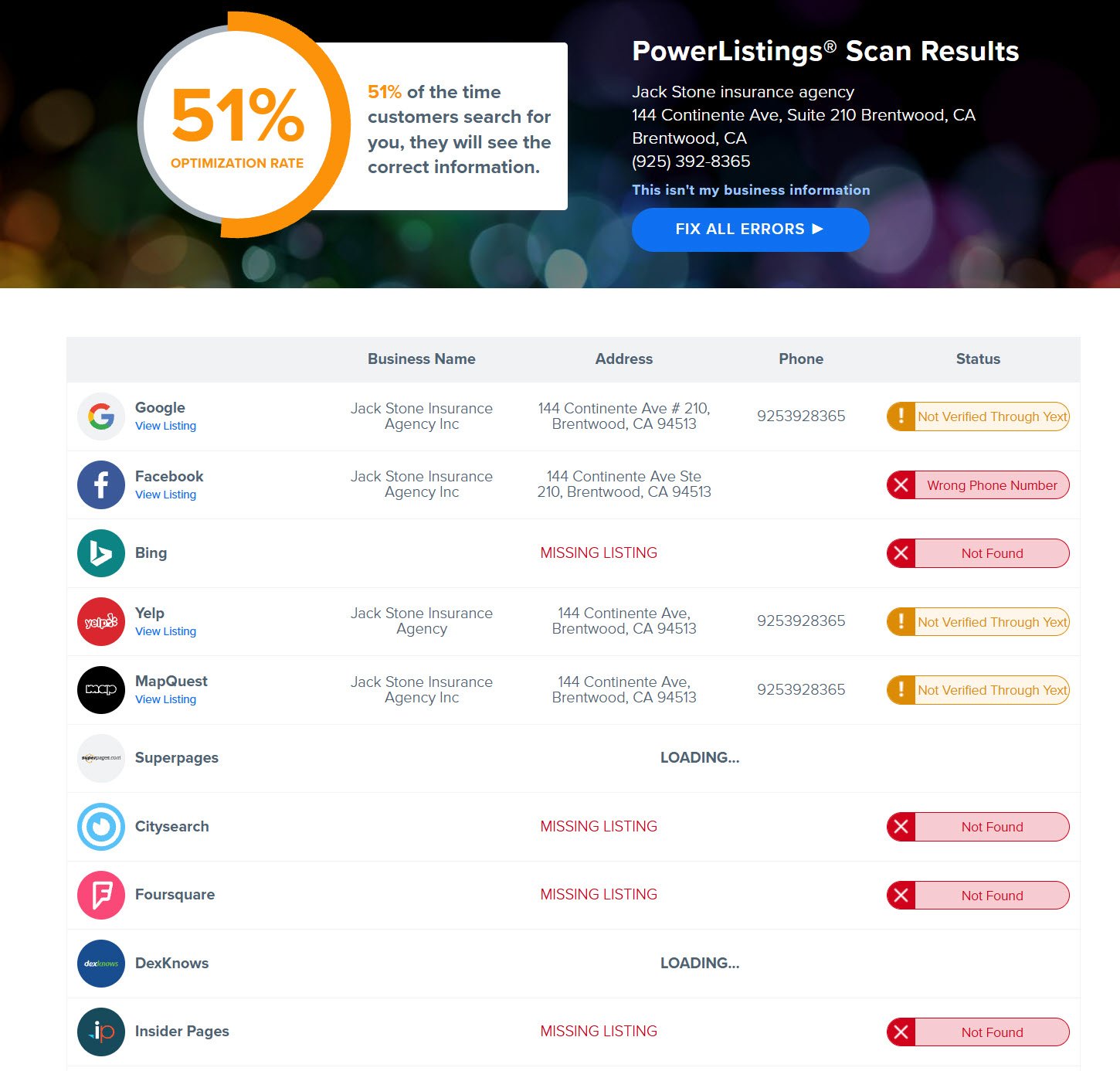
Use one if you have more than three locations, or if you’ve moved, rebranded, or changed phone numbers in the last two years.
For a single-location business that hasn’t changed anything, steps 1 through 3 take fifteen minutes and usually suffice.
Further reading: [How to Run a Local Citation Audit]
How to Merge Duplicate Yelp Listings
Yelp merges duplicates rather than deleting them. That’s good news — it means the reviews on the losing page can survive.
1. Decide Which Listing Survives
Most guides say keep the one with more reviews. That’s the right answer maybe 70% of the time.
Check three things first:
- Review recency: 20 recent reviews may outweigh 60 from 2019
- Content depth: owner photos, responses, and a completed profile are hard to rebuild
- Downstream references: whichever page Apple Maps points at is already embedded elsewhere
Fernwood kept the older page. More reviews, more owner responses, and Apple Maps was already referencing it — even though its address was wrong.
Here’s the decision in one view:
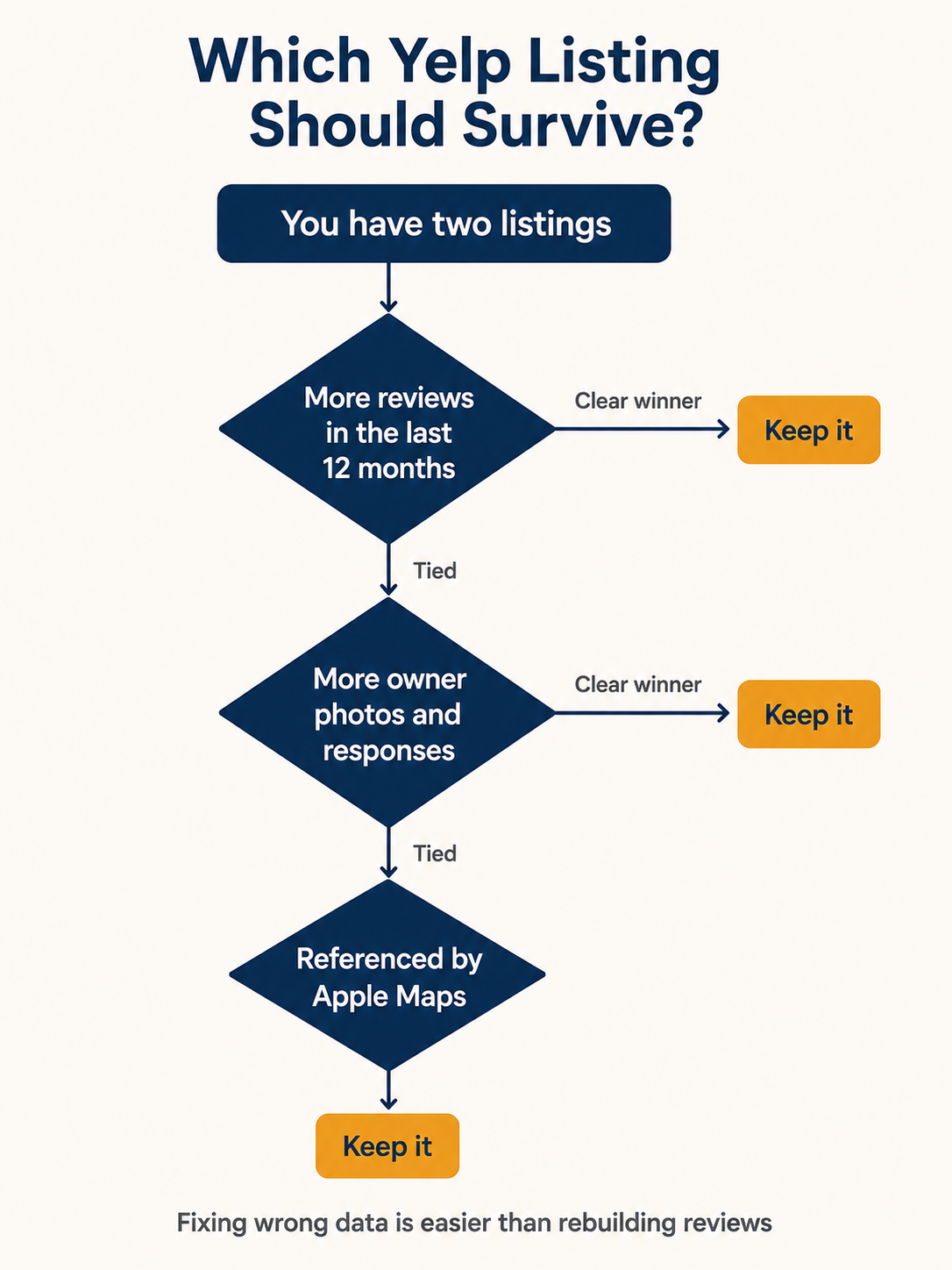
Wrong data on the right page is a fifteen-minute fix. The reverse isn’t.
2. Claim Both Pages
Claim the survivor first through Yelp for Business, then claim the duplicate.
Claiming the duplicate matters more than it looks. It gives you edit rights and opens a support channel tied to that specific page, which speeds up everything after.
3. Report It Through “Suggest an Edit”
On the page you want removed, click the “Edit” link beneath the address. Scroll to the bottom and tick the “This is a duplicate of another business on Yelp” box.
Like so:
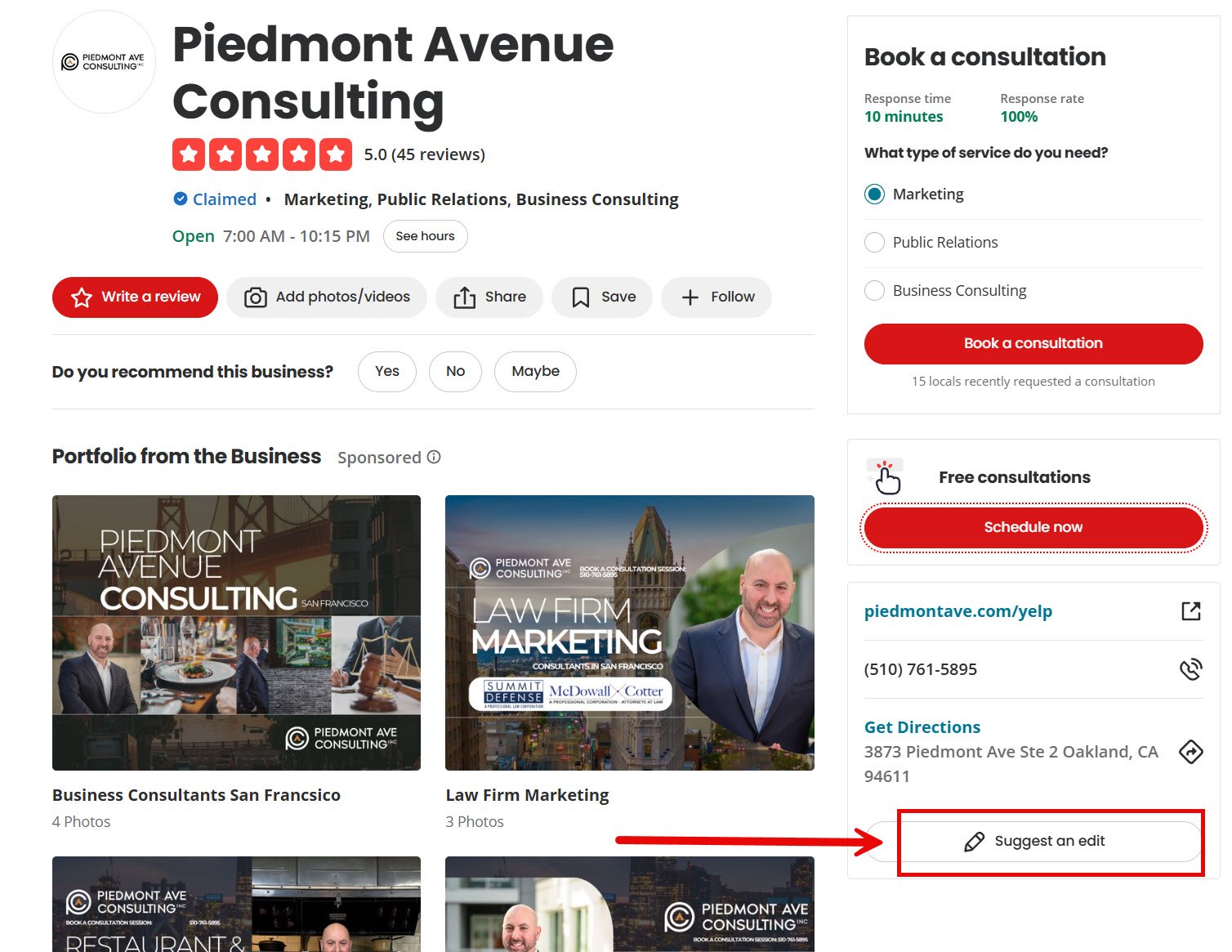
Then paste the URL of the surviving page into the notes field before you submit.
That last detail does most of the work. A report without the survivor’s URL forces a moderator to find the match themselves, which is where reports stall.
4. Follow Up With Yelp Support
Straightforward duplicates often merge within a few days. Messier ones — both claimed, both carrying reviews — usually need a human.
If nothing has changed after about a week, contact Yelp support with both URLs and proof of ownership: a business license, lease, or utility bill at the current address.
Note
Merging consolidates the pages, but review migration isn’t guaranteed in every case. Confirm with support before you merge if the losing page holds reviews you can’t afford to lose.
5. Update the Survivor, Then Clean Downstream
Once the merge lands, fix the survivor’s address, hours, categories, and photos.
Then claim your Apple listing through Apple Business Connect and correct it there directly. Downstream platforms refresh on their own schedule, and some hold stale data for weeks.
How to Stop Duplicates Coming Back
Cleanup is one afternoon. Prevention is a habit.
Lock Your NAP to One Format
Write your name, address, and phone number once, exactly as they should appear, and store it where your team can reach it.
Decide the small things and never vary them: “Suite 200” or “Ste 200,” “&” or “and,” with or without “LLC.”
Every citation you create after that copies from the same source.
Update — Never Recreate — When You Move
The most common cause of duplicates is treating a move as a fresh start.
Edit the existing Yelp page. Change the address on the page that already holds your reviews.
Creating a new one abandons every review you earned.
Audit Every Quarter
Put fifteen minutes in your calendar every three months and run the Yelp name search plus the site:yelp.com search.
Duplicates caught at two months are trivial. Duplicates caught at two years have accumulated reviews, syndicated errors, and downstream copies of their own.
What About the “Google Penalty” Claim?
Search this topic and you’ll find articles claiming Google treats duplicate Yelp listings as spam, that a Google study proved they hurt rankings, and that specific percentage drops follow.
Treat those claims carefully.
Google has consistently said there’s no duplicate content penalty for ordinary duplication, and it certainly doesn’t penalize your website for what a third-party directory publishes about you. Google’s local documentation lists relevance, distance, and prominence — no penalty mechanism appears anywhere in it.
Why does the distinction matter?
Because the myth produces the wrong response. If duplicates were a spam penalty, urgency would be everything and you’d rush to delete. Since they’re a division problem, the goal is consolidation — merging so the signals recombine, not deleting so they vanish.
Delete the wrong page and those reviews are gone. Merge it and they come home.
Tip
Apply the same scepticism to the traffic and percentage statistics circulating on this topic. Several widely repeated figures trace back to no original source at all.
Duplicate Yelp Listing FAQs
How long does it take Yelp to merge duplicate listings?
Simple cases — one claimed page, one unclaimed page with few reviews — often resolve within a few days of a “Suggest an Edit” report.
Complicated cases take longer. If both pages are claimed, or both hold significant reviews, expect one to three weeks and at least one round of correspondence with support.
Attaching the survivor’s URL to your report is the single biggest factor in speed.
Will I lose my reviews if I merge two Yelp listings?
Usually not. Merging is designed to consolidate pages rather than delete them, and reviews from the losing page typically move across.
But it isn’t guaranteed in every scenario. If the losing page holds reviews you can’t afford to lose, confirm the outcome with Yelp support before you submit the merge request.
Deleting a page, by contrast, does destroy its reviews. That’s why merging is the recommended route.
Can customers create a duplicate Yelp listing for my business?
Yes. Yelp lets users add business pages, so a customer who can’t find you — often after you’ve moved — may create one so they can check in or leave a review.
These are among the most common duplicates, and the hardest to notice, because nobody at your business was involved in creating them.
Do duplicate listings on other directories cause the same problem?
The mechanism is identical anywhere: split signals plus contradictory NAP data.
The scale differs. A duplicate on a small directory affects little. A duplicate on Yelp, Google Business Profile, or Apple Maps affects a lot, because those platforms feed others.
Fix the large platforms first, then work down.
Start With the Search That Takes Two Minutes
There’s a lot of machinery described above, and most businesses need none of it.
Open Yelp. Search your business name without the suffix. Then run site:yelp.com "your business name" in Google.
If one page comes back, you’re clean — set a quarterly reminder and move on.
If two come back, you now know why your review count never looked right. Claim both, report the duplicate with the survivor’s URL attached, and check Apple Maps in a week.