

Keyword research for multiple locations means building a separate keyword set for every city, suburb, or service area you operate in — instead of one national list you paste onto every page.
The difference matters more than most people expect.
Because the same query returns different results in different cities. Google personalizes local SERPs by proximity, and the competitors you fight in Columbus are not the competitors you fight in Toledo.
So a single keyword list built for “the business” leaves you optimizing for an average that doesn’t exist anywhere.
The process below scales from two locations to two hundred. It’s the same eight steps either way.
Here’s what changes your keyword set from location to location:
- Search volume: The same service gets very different demand in a metro of 900,000 versus a town of 40,000
- Modifier language: Some markets say “AC repair,” others say “air conditioning service”
- Competition depth: A big metro has 40 optimized competitors; a smaller market may have four
- SERP layout: Map packs, “near me” prompts, and directory listings appear at different rates by city
- Service mix: Not every branch offers every service, so not every location earns every keyword
Throughout this guide, I’ll use one running example: Northline HVAC, a heating and cooling company with six branches across Ohio and Michigan — Columbus, Cleveland, Toledo, Dayton, Fort Wayne, and Ann Arbor. Four core services: AC repair, furnace installation, duct cleaning, and heat pump installation.
Six locations. Four services. That’s 24 potential page-level keyword sets before you add a single long-tail variation.
Here’s the full workflow before we go step by step:
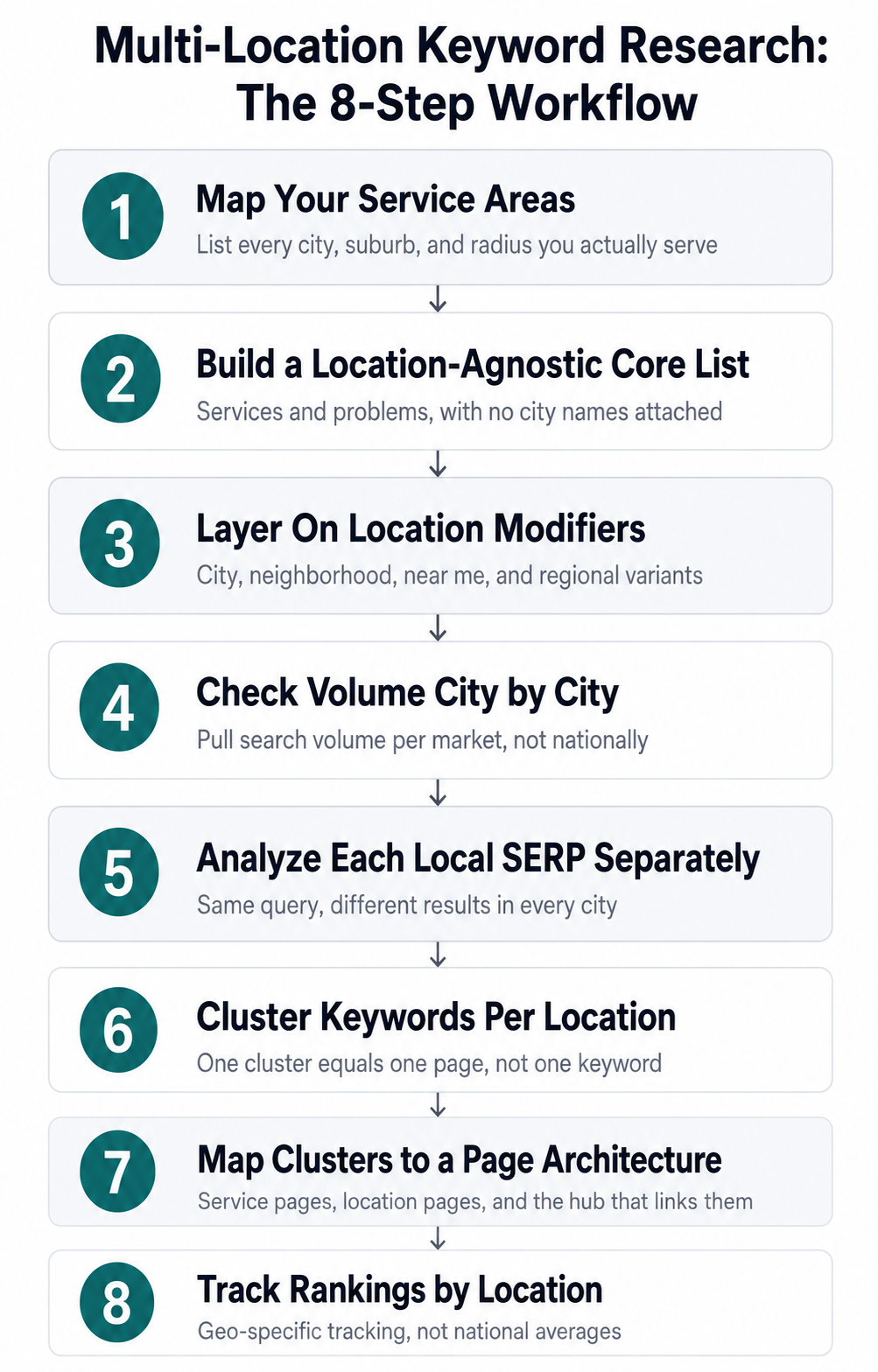 The eight-step workflow for doing keyword research across multiple locations.
Work through them in order. Skipping ahead to modifiers before you’ve mapped your service areas is how you end up with 400 keywords and no page to put them on.
1. Map Your Service Areas Before You Touch a Keyword Tool
Your keyword list is only as accurate as your location list.
So start there.
Write down every place you genuinely serve — not every place you’d like to. Google’s local algorithm rewards proximity and physical presence, and a page targeting a city where you have no address, no reviews, and no technicians will struggle regardless of how well you optimize it.
For each location, record:
- The city name as people actually search it
- Nearby suburbs and neighborhoods within your service radius
- The metro or regional name locals use (“Greater Cleveland,” “the Miami Valley”)
- Which services that branch offers, since this varies more than people admit
- Whether you have a physical address there or serve it from a nearby branch
That last one changes your strategy. A branch with an address can rank in the map pack. A radius-only service area competes in organic results only — which means your keyword targets shift toward informational and long-tail queries rather than head terms.
For Northline HVAC, that split looks like this: physical branches in Columbus, Cleveland, Toledo, and Fort Wayne, plus radius-only coverage of Dayton and Ann Arbor from the nearest branch.
Note Don’t build location pages for cities you serve “sometimes.” Thin location pages with no real presence behind them are the single most common cause of a multi-location site being seen as low-quality.
2. Build a Location-Agnostic Core Keyword List
A core keyword is a service or problem term with no geography attached — “ac repair,” “furnace not igniting,” “heat pump installation cost.”
This is your base layer. You’ll multiply it against locations in the next step, so getting it clean now saves hours later.
Build it from four sources:
- Your services and product pages: Every distinct thing you sell is a seed
- Your sales and support calls: The phrasing customers actually use
- Competitor site navigation: Their menu structure is a free keyword map
- Keyword tools: Expand each seed with matching terms and questions
Strip every city name out as you go. If “ac repair columbus” appears, cut it back to “ac repair” and move on.
Why?
Because you want the modifier logic to be a system you apply, not a list you hand-assemble. Systems scale to a new location in an afternoon. Hand-assembled lists don’t.
Group the survivors into three buckets:
- Service terms: What you do — “duct cleaning,” “furnace installation”
- Problem terms: What’s broken — “ac blowing warm air,” “furnace short cycling”
- Commercial terms: How they buy — “hvac contractor,” “emergency ac repair cost”
Northline’s core list came out at 61 terms across those three buckets. That’s a healthy size. Under 20 usually means you haven’t mined support tickets yet.
3. Layer On Location Modifiers Systematically
A location modifier is the geographic phrase people attach to a service query — a city, a neighborhood, a region, or “near me.”
You apply modifiers to your core list in a matrix. Rows are core keywords, columns are modifier patterns.
Here’s what that structure looks like:
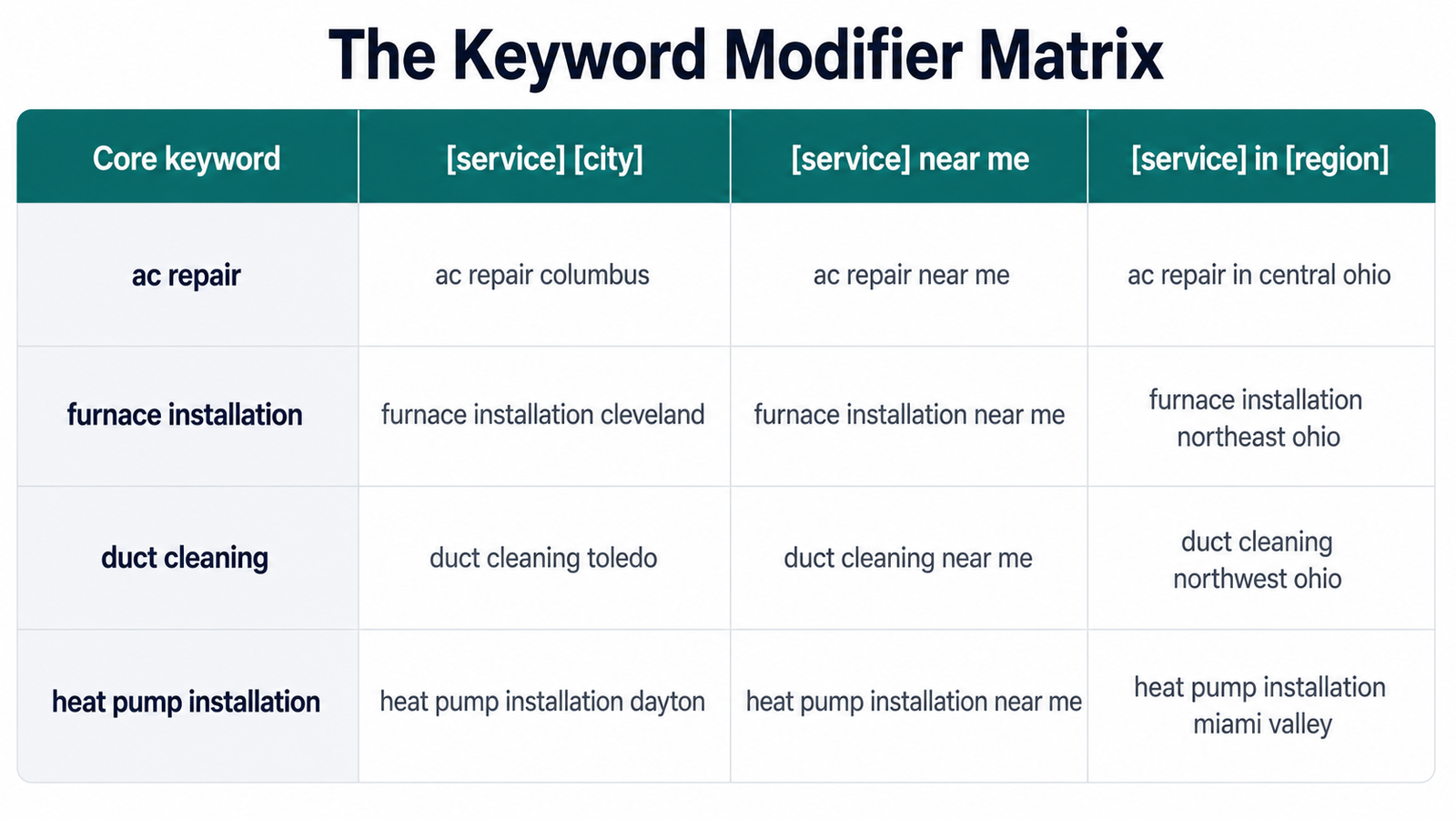
Notice that “near me” produces one keyword for every service, not one per city. Google resolves “near me” using the searcher’s device location, so you optimize for it through your local signals — address, category, reviews — rather than through 400 separate pages.
The modifier patterns worth building are:
- [service] [city]: The workhorse — “ac repair toledo”
- [service] near me: High-intent, resolved by proximity
- [service] in [region]: Catches metro-level searches
- [service] [neighborhood]: Only for dense urban markets where neighborhoods have identity
- [city] [service] company: Commercial variant with different SERP competition
- emergency [service] [city]: Urgency variant, usually low volume and high conversion
Six patterns against 61 core terms across six locations produces a raw list in the thousands. That’s fine. Most of it dies in the next step.
Tip Build the matrix in a spreadsheet with a simple CONCAT formula rather than typing combinations by hand. Adding a seventh location then takes one column, not one afternoon.
4. Check Search Volume City by City
Most of your raw combinations have zero volume. Your job now is finding which ones don’t.
The mistake here is checking volume at a national level. “Ac repair” gets serious national volume, but that number tells you nothing about whether “ac repair dayton” is worth a page.
So pull volume with the country and — where your tool supports it — the metro set to the market you’re evaluating.
Then sort ruthlessly. For a typical local service business, your thresholds look roughly like this:
- Over 200/month in a single city: Deserves its own dedicated page
- 50–200/month: Belongs in a cluster on a broader page
- 10–50/month: Worth a section or an FAQ answer, not a page
- Under 10/month: Keep it in the sheet, don’t build for it
Small numbers are not a reason to quit. A local query at 90 searches a month with high commercial intent will outperform a national informational term at 9,000.
For Northline, “ac repair columbus” landed at 1,300 searches a month with a difficulty of 18. “Ac repair dayton” came in at 320 with a difficulty of 11 — a fifth of the volume, but also a much thinner competitive field.
Different numbers. Same decision: both earn a page.
Now watch what happens at the low end. “Duct cleaning ann arbor” showed 40 searches a month. Not enough for a standalone page, but exactly right as a section inside the Ann Arbor service-area page.
Note Zero reported volume doesn’t always mean zero searches. Tools under-report hyper-local long-tail terms badly. If a query shows real businesses ranking with dedicated pages, treat that as evidence the volume exists.
5. Analyze the SERP for Each Location Separately
Two cities, one keyword pattern, two completely different competitive pictures.
This is the step most people skip. And it’s the one that decides whether your page has a realistic path to page one.
Run a SERP check for the same query in each market and record four things:
- Whether a map pack appears, and how many organic results sit above it
- Who ranks organically — local competitors, national directories, or aggregators
- What page type ranks — a location page, a service page, or a blog post
- Whether the top results are actually local to that city
That last point is your opening. When national directories occupy the top five and no genuine local business ranks, a well-built location page can break through faster than the difficulty score suggests.
Here’s how a local SERP splits up:
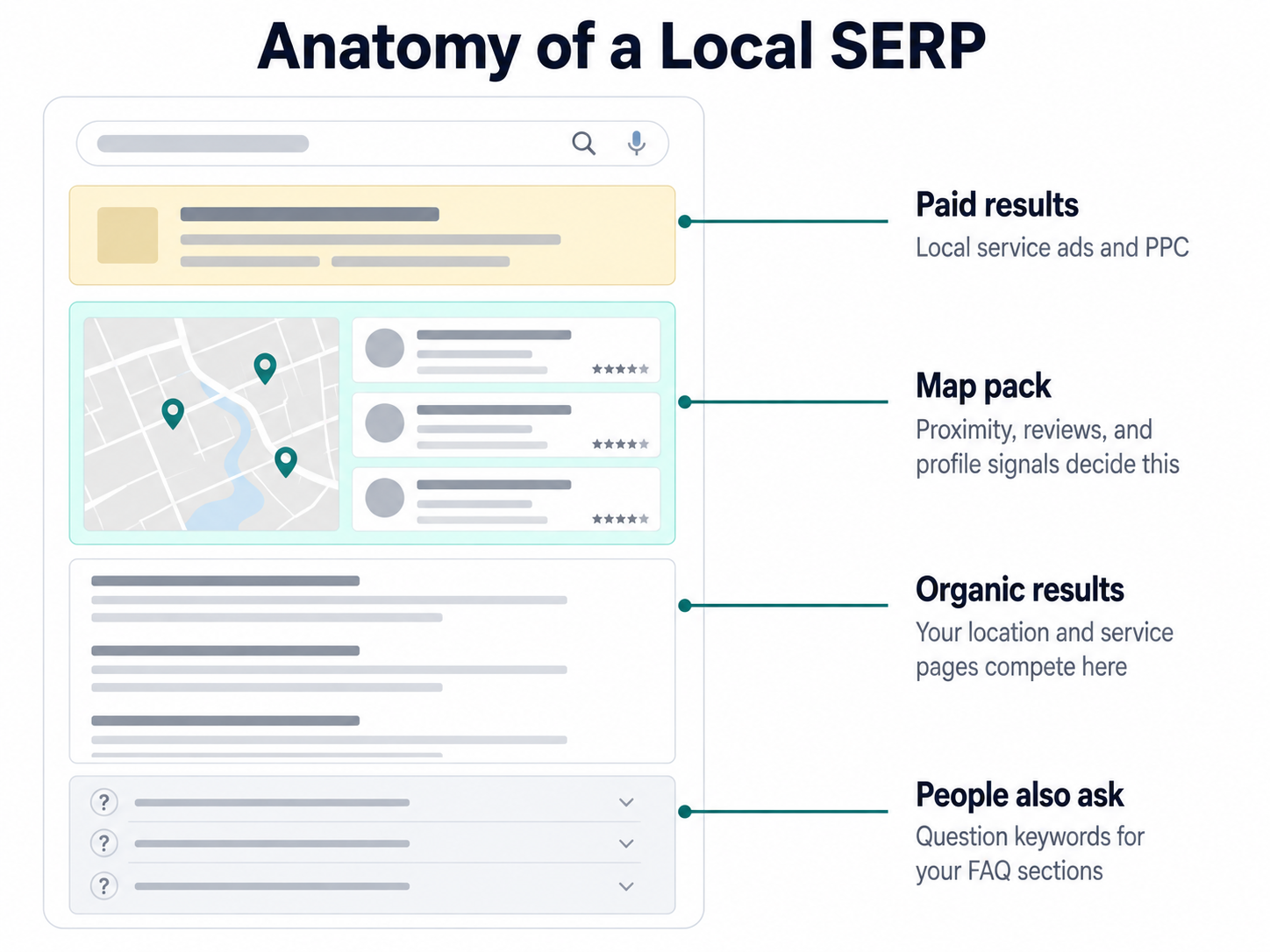
The map pack and the organic results are two separate contests. Your keyword research feeds the organic side; your Google Business Profile feeds the map pack.
Both matter. But only one of them is a content problem.
Note which queries trigger a map pack at all. Purely informational terms — “how long does a furnace last” — usually don’t, which makes them fair game for one central blog post rather than six location variants.
6. Cluster Keywords Into Per-Location Groups
A keyword cluster is a group of queries that share the same search intent and can be satisfied by a single page.
Clustering is what stops a six-location site from becoming a 400-page mess.
The rule: if two keywords return substantially the same top results, they belong on one page. If they return different results, they need different pages.
For Northline’s Columbus market, the clustering came out like this:
- Cluster A — “ac repair columbus”: Also covers “air conditioning repair columbus,” “ac repair columbus ohio,” “24 hour ac repair columbus”
- Cluster B — “furnace repair columbus”: Different intent, different SERP, separate page
- Cluster C — “hvac company columbus”: Commercial and comparison-driven, belongs on the location landing page
- Cluster D — “ac not cooling”: Informational, no city modifier, belongs in the national blog
Cluster D is important. Informational content doesn’t get duplicated per city — that’s how you create six near-identical pages competing with each other.
Which brings up the thing that quietly kills multi-location sites: keyword cannibalization.
When your Columbus and Cleveland pages both target “ac repair ohio,” Google picks one and suppresses the other. Or worse, alternates between them and neither builds authority.
So assign each cluster to exactly one URL. Write it in the sheet. Enforce it.
7. Map Clusters to a Page Architecture That Scales
You now have clusters. They need somewhere to live.
The structure that works for multi-location businesses is a three-tier hierarchy: a service hub, location pages, and location-plus-service pages where volume justifies them.
Here’s the shape:
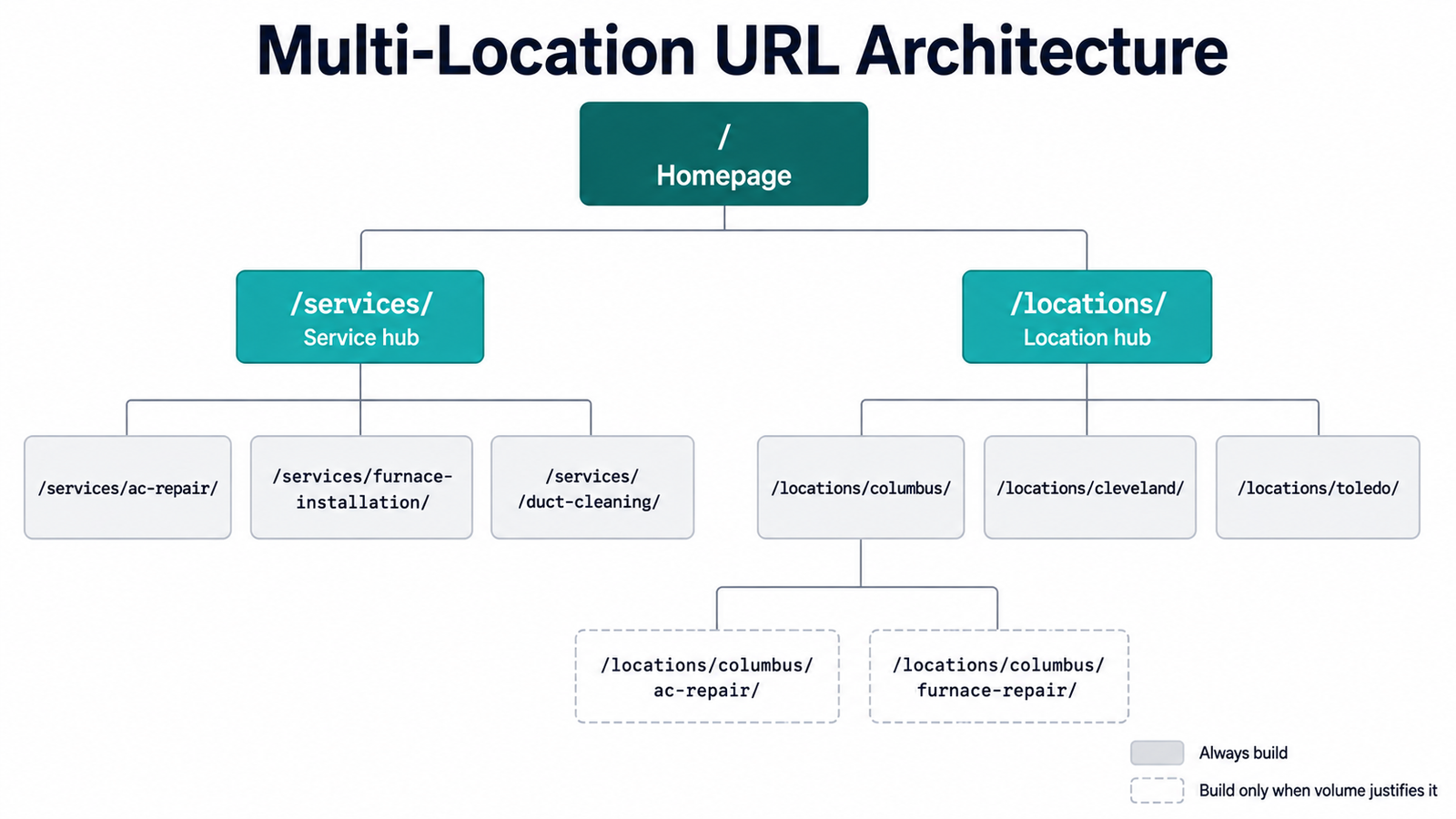
The dashed tier is conditional. Build /locations/columbus/ac-repair/ when the keyword clears your volume threshold and the SERP shows dedicated pages ranking. Skip it when a section on the Columbus location page will do.
Each page type gets a distinct job:
- Service pages: Target unmodified core terms and carry the deep technical content
- Location pages: Target [service] [city] head terms plus local proof — address, reviews, technicians, service radius
- Location-service pages: Target the highest-volume city-plus-service combinations only
- Blog posts: Target problem and informational terms, once, nationally
Then link them deliberately. Every location page links up to its service hub and across to the services offered at that branch. Every service page links down to the locations that offer it.
8. Track Rankings by Location, Not Nationally
A national rank tracker will tell you that you’re position 14 for “ac repair.”
That number is meaningless.
Because you’re not competing nationally. You’re competing in six discrete markets, and your real position might be 3 in Toledo and 22 in Cleveland.
So configure tracking at the city level. Most rank trackers let you set a specific location per keyword group — use it, and build one tracking group per market.
Watch three things per location:
- Organic position for each cluster’s primary keyword
- Map pack presence, tracked separately from organic
- Which URL Google chose to rank — a mismatch means cannibalization
That third one catches problems early. When Google ranks your Cleveland page for a Columbus query, your internal linking or your on-page geo signals are confusing it.
Re-run your volume checks quarterly. Local demand shifts seasonally in ways national data flattens out — “furnace installation toledo” and “ac repair toledo” peak six months apart, and building your content calendar against an annual average means publishing both at exactly the wrong time.
Common Mistakes in Multi-Location Keyword Research
Four failure patterns show up over and over.
Duplicating one page across every city. Swapping the city name in an otherwise identical page produces thin content that ranks for nothing. Each location page needs genuinely local material — staff, projects, service radius, local pricing context.
Targeting cities where you have no presence. Proximity is a ranking factor you can’t optimize around. A page for a city 90 minutes from your nearest branch will not win the map pack, and it dilutes the pages that could.
Building a page for every keyword. Clusters exist because several queries share one intent. Six pages for six phrasings of the same intent is cannibalization by design.
Ignoring modifier language differences. Some markets search “hvac contractor,” others “heating and cooling company.” Check the actual volume split per city before standardizing your phrasing.
FAQs
How many keywords should I target per location?
Plan for three to eight clusters per location, not three to eight keywords.
Each cluster bundles four to fifteen related queries onto one page.
For a business with four services and six locations, that’s roughly 24 to 48 clusters total — a manageable content plan, and a very different thing from a 4,000-row keyword list.
Should I create a separate page for every city I serve?
Only for cities where you have a physical presence or a genuine service footprint.
Build pages for cities with an address, staff, and reviews.
For radius-only coverage, one regional page that names the surrounding towns usually performs better than five thin city pages.
How do I find keyword volume for a specific city?
Set your keyword tool to the country level, then check the city-modified version of the query directly — “ac repair toledo” rather than filtering “ac repair” by metro.
Most tools report volume for the modified phrase itself, which is the number you actually need.
Cross-check with Google Search Console once you have data. Your own impression counts per query and per country are more reliable than any third-party estimate.
Does “near me” need its own page?
No.
Google resolves “near me” queries using the searcher’s device location, not the phrase on your page.
You compete for it through your Google Business Profile, your NAP consistency, and your local reviews — not through a page optimized for the words “near me.”
How often should I redo multi-location keyword research?
Refresh volume and SERP checks quarterly, and rebuild the full matrix annually.
Seasonal service businesses should check before each season starts rather than on a fixed calendar.
New locations get their own research pass at launch — don’t inherit another market’s keyword set.
Start With One Market
Twenty-four page-level keyword sets is intimidating on day one.
So don’t build twenty-four.
Pick your highest-volume market, run all eight steps for that one location, and publish the pages. You’ll learn which modifiers convert and which clusters were too broad — cheaply, on one market instead of six.
Then clone the process, not the pages.
Open a spreadsheet this week and start with step one: list every city you actually serve, and mark which ones have a real address behind them. Everything else in this guide builds on that column.